Thursday, March 12, 2009

Telcos vs Internet providers

What a big break, isn't it? I did not give up ;) I was just busy at work to help tuning the performance of a product which is going to be “GA” this month. I mostly focused on the browser-side code, trying to mitigate effects of flawed designs. Anyway, I'll try to use some of the collected materials in a future post.


From jopemoro, with CC-ByND.
Telecommunication operators (telcos) used to have a captive market:
  • Land lines subscribers do not switch very often from one provider to its competitor, even for long distance call plans. There is some inertia that helps securing their investments in other technologies.
  • Cellular phone subscribers are more susceptible to change, especially now that they can keep their number when subscribing to another operator. But 3-years plans are efficient tools used by operators to keep their subscribers under control.
  • Usage of the communication bandwidth is very much predictable. Companies have sized the minutes allocated to each plan so they can get the most from users who do not consume their quotas.
In this industry, the rule of “segment the market to maximize your revenues” is well applied.

Late last year, few operators [1, 2] started offering month-to-month plans, without term contract. Why? Because subscribers want more than just voice communication, they want more flexibility at a reasonable price.

With services like Twitter [3] or Google Calendar [4], any cellphone users can get notifications by SMS. When incoming SMS are billed, the incentive to look for an alternative is big!

Nowadays, a growing number of people have (or will to have) smart phones with multiple communications capabilities: to send pictures, to get live information, to access a map and benefit from their embedded GPS, to use VOIP services, etc. [5]

If local communication plans have usually a fair price (not the long distance plans or the fees when on roaming), prices of the “data” plans are usually crazy. With a smartphone equipped with a 8 MegaPixel digital camera, sending quite a few images over the telco networks is prohibitive...


From mag3737, with CC-BA-NC-SA
So people tend to use more and more direct Internet accesses, in the offices, at home, in cafes, libraries, etc. It so demanded, that non-profit organizations offers networks of Internet hotspots [6].

Thanks to direct Internet accesses which provide better bandwidth than broadband ones, smartphone users can use long distance calls (with Skype [7]), get their voicemail (GrandCentral [8]), stream videos (Qik [9]).

If I can see the month-to-month plan offering as a tentative to keep their customers, telcos should also revisit the data plan offering to avoid more customer base erosion! Because carrying data means carrying almost anything, I think should transform themselves from pure telecommunication operators to Internet providers.

A+, Dom
--
Sources:

  1. No Contract Required — New Month-To-Month Agreement Gives Verizon Wireless Customers Even More Freedom, on Verizon website.
  2. Fido removing system access fees, by on CBCNews website.
  3. Twitter is a free social software where people post updates (limited to 140 characters, same limitation with SMS) and that followers can get automatically.
  4. Google Calendar is time management platform where people can manage their agendas and invite other people. Event reminders can be sent by e-mail and by SMS for free.
  5. For a better description of possible services, see my post: Hand held devices and sensors.
  6. Free Wifi initiatives: Île Sans Fil of Momtréal, Wireless Toronto, etc. More in this directory.
  7. Skype is a service allowing users to make phone calls over Internet. This popular service belongs to eBay (acquired in Sept. 2005).
  8. GrandCentral: see the recent update posted on TechCrunch, about GrandCentral which is going to reborn as Google Voice.

Monday, February 9, 2009

Google App Engine: Free Hosting and Powerful SDK

(This post is part of the series Web Application on Resources in the Cloud.)

Google App Engine (GAE) [1] is an open platform made available by Google to host Web applications:
  • It can serve static pages (HTML, CSS, JavaScript, images, etc.).
  • It can serve dynamic pages. The programming language is Python [2] (with limited features). The default template framework is Django [3].
  • It can persist data in Google BigTable (with a query language similar to SQL, but with restricted features).
  • It offers transparent scaling and load-balancing.
  • Its sources are open and freely available. Google allows to host up to three applications by account, as sub-domains of appspot.com (at least during the preview period).
Some people, like Dare Obasanjo [4], consider GAE as implementing “Platform as a Service” paradigm. I agree and think GAE offers a core element to implement “Software as a Service” (the hype SaaS). In general, I think that SaaS can help IT companies delivering value to their customers at a better quality/price ratio. Understanding GAE strengths should encourage development teams to give a close look at the entire SaaS concept.

Free Service

GAE is offered free of charges during the preview period. In the future, customers will be billed only for what they have consumed (disk space, bandwidth, CPU time, etc.). This practice has been adopted by many providers of services in the cloud, like Amazon [5] and it Amazon Web Services (AWS) offer.

The Software Development Kit (SDK) [1] is open, and anyone can take a look at it, can customize it for his own needs, and can even submit patches. For now, only one programing language is supported: Python [2]. The SDK is delivered with a standalone runtime environment.

Python is also an open system, created by Guido van Rossum who has been working for Google since 1995. In my opinion, this combination is an argument against developers complaining about the need to learn yet another language: Python is a really powerful language and will continue to have a full support by Google as their favorite language.

In association to Python, Django [3] is the template language helping to create applications compliant with the Model-View-Controller (MVC) pattern [6]. Django is also an open source software.

To get the best of the languages and of the standalone GAE runtime, I strongly suggest setting up Eclipse (another open-source software) [7, 8]. Eclipse might not be the ideal candidate for GAE application development, but it provides an extensible platform easy to leverage. For example, egit [9] is a Eclipse plug-in handling transactions with Git repositories (like Github.com [10]).

Servicing static and dynamic pages

GAE can host 1,000 files, each one smaller than 1Mb, for a grand total of 500 Mb per application [11]. Usually, the static files are accessories: images, style sheets, etc. But the offered space allied to Google's scalable infrastructure can be also leverage to host almost any file (HTML, FLV (Flash), CSS, JavaScript, etc.). App Engine Fan describes how to setup GAE for this usage [12], as Matt Riggott [13].

The following handler definition, which should be located into the app.yaml configuration file, indicates that all requests should be served from the corresponding files located in the directory static.
handlers:
- url: /
  static_dir: static/
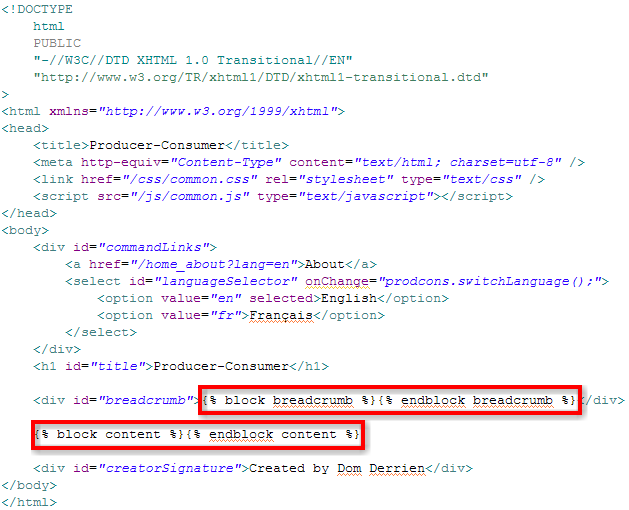
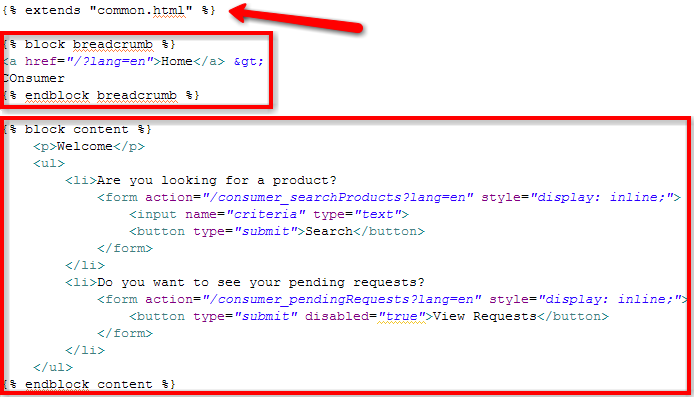
Dynamically generated content, like developers are used to producing with PHP for example, can be implemented with Django templates [3]. The following template defines the general Web page pattern. And the second template is just extending it by overriding the extension points.


Common.html template with the Web page organization and the extension points.


Producer.html template overriding the extension points with the page specific elements.

Note: because of internationalization concerns, I strongly recommend to NOT code Web pages as the ones above. Refer to my post on Internationalization of GAE Applications [14] for a better implementation.

Quickly, it is possible to use GAE to host static and dynamic pages on the domain appspot.com (pattern is http://[application-name].appspot.com/). Integrating these pages transparently in your own domain allows future updates without having your readers to point to a new Web address. You need to setup Google Apps for your Domain and follow their instructions [15].

App Engine Fan explains how to prevent access to your application from unknown domains [16]. In a private network, you can even open the GAE server to remote access [17].

Access to Google BigTable

In the Web application world, data persist mainly in databases. Databases scale, maintain indexes (providing quickly search results), support transaction (update, then commit or revert). Most databases are relational databases [18]. Among the well know relational databases, there are: Derby, Oracle, DB2, MySQL. SQL (Structured Query Language) is often the query language of relational databases.

GQL (Google Query Language) is very similar to SQL [19]. The discrepancies are due to GAE architecture. For example, to preserve its scalability of the underneath database, GQL does not offer the possibility to JOIN tables. I am not database expert, but I consider all limitations being workable and some of them are very sane.

One important issue with database is related to their central place: if they are corrupted, system can stop working. Being able to backup and restore them is critical. In April 2008, Google communicated about possible export file formats [20]. I have not found if this feature has been published... However, I found Aral Balkan's Gaebar application (GAE Backup And Restore) [21] which covers the basic functionality and even more (like the staging concept).

Update 2009/02/10:
In the SDK release 1.1.9, Google describes ways to upload data from a CSV into BigTable, and to download data into a local development server. Refer to the documentation on GAE Website [1].

Going further

Google has developed a GAE application that is gallery for other GAE applications [22]. Many applications are described there. Interviews of successful implementers are also available on GAE Website [1].

On April 10, 2008, Niall Kennedy posted a detailed article describing GAE architecture [23]. Many others people continue to publish on GAE and on Cloud computing issues in general [24]. It is a really hot topic ;)

Update 2009/02/10:
Dare Obasanjo published another post on Dare Obasanjo: Google App Engine on the road to becoming useful for building real web applications

A+, Dom
--
Sources:
  1. Google App Engine Website, and GAE Service API documentation.
  2. Official Python Website. Python history on Wikipedia. Guido van Rossum's blog (Python inventor).
  3. Django Website, with the section on its template language.
  4. Cloud Computing Conundrum: Platform as a Service vs. Utility Computing by Dare Obasanjo.
  5. Amazon Web Services Website.
  6. MVC Pattern applied to GAE Applications... (another post to be published soon).
  7. Eclipse Website.
  8. Article Configuring Eclipse on Windows to Use With Google App Engine from GAE documentation site.
  9. Eclipse plug-in for Git repositories: egit. Check egit short installation guide.
  10. My post on Git as my New SCM Solution.
  11. Quota description on GAE Website, on GAE blog, and on Wikipedia.
  12. Free Webhosting, Google App Engine style, by App Engine Fan.
  13. Using Google App Engine as your own Content Delivery Network by Matt Riggott.
  14. Internationalization of GAE Applications... (another post to be published soon).
  15. Access to the Standard Edition of Google Apps for Your Domain (GYAD) service and instruction on how to setup a GAE application for your domain.
  16. The darker side of multiplexing, or how to prevent site hijacking by App Engine Fan.
  17. Access Google App Engine Development Server Remotely, by Josh Cronemeyer.
  18. Definition of relational database by Wikipedia.
  19. GQL reference page on GAE Website.
  20. Getting your data on, and off, of Google App Engine on GAE official blog.
  21. Google App Engine Backup and Restore (Gaebar) by Aral Balkan
  22. Google GAE Application Gallery, being itself a GAE application.
  23. Google App Engine for Developers, by Niall Kennedy.
  24. Architectural manifesto: An introduction to the possibilities (and risks) of cloud computing on developerWorks.

Sunday, January 25, 2009

Automatic Testing of GAE Applications

(This post is part of the series Web Application on Resources in the Cloud.)

I am not a purist when it is time to apply a development method, I am a practical guy!

Update 2009/11/20
At one point, I switched to App Engine Java (see my post Google App Engine Meets Java). One of my argument at that time was the lack of tools Python-side to produce code coverage numbers... I've just posted a lengthy article about Unit tests, Mock objects, and App Engine for the Java back-end. The techniques and the code I share in this post allow me to reach the mystical 100% of code coverage, for a project with over 10,000 lines for the business code. See you there ;)

For example, I know by experience how important testing code as soon it is produced. And these tests must run after each code delivery to detect defects and regressions as soon as possible [1]. I allocate as much time to write tests (unit tests most of the time, functional tests occasionally) as I allocate to write code. And no task is considered complete if the corresponding tests do not cover 100%* of its code! I admire adopters of the Test Driven Development (TDD [2]) approach.

When searching information to test Google App Engine (GAE) applications, I was happy to find a post [3] written by Josh Cronemeyer who says:
My favorite way to start any project is by doing TDD. 
If you follow GAE tutorial [4], you can create a correctly designed application implementing the Model-View-Controller (MVC) pattern [5]. Testing such an application which organizes its behavior in different logical area means testing each areas independently:
  1. Testing Python models
  2. Testing Python business logic
  3. Testing data injection in Django templates
  4. Testing rendered HTML pages
  5. Verifying the use-cases' implementation
In the following sections, I am going to summarize information I gathered. If I missed any element, please, let me know by posting a comment ;)

Testing Python models

Verifying that your models work as expected is really important. If we can rely on the robustness of Google Big Database implementation (after all, more and more of their applications run on App Engine), you need at least to detect regressions that our future refactoring operations might introduce.

To learn how to setup your environment, read the detailed post of Josh Cronemeyer: Unit Test Your Google App Engine Models.
What follows is some information to get you started writing unit tests against a GAE model. First, a list of the tools you need to install.
  • Nose is a tool for running your python unit tests.
  • NoseGAE is a plugin for nose that bootstraps the GAE environment.
An alternative is to use gaeunit [6] but tests might impact the persistence layer.

Josh Cronemeyer suggests to create a new stub data store before running all tests (function called in your test setUp()):

from google.appengine.api import apiproxy_stub_map
from google.appengine.api import datastore_file_stub

def clear_datastore(self):
   # Use a fresh stub datastore.
   apiproxy_stub_map.apiproxy = apiproxy_stub_map.APIProxyStubMap()
   stub = datastore_file_stub.DatastoreFileStub('appid', '/dev/null', '/dev/null')
   apiproxy_stub_map.apiproxy.RegisterStub('datastore_v3', stub)

Testing Python business logic

What do I mean by Python business logic? This is the piece of code that deals with the end-user requests and that does some computations before pinging the persistence layer. For example, a function verifying the format of e-mail addresses (using regular expressions) belongs to that category.

This last 6 years, I have mainly used Java as the programming language to develop the server-side logic. Java is a simple and powerful programming language. Java benefits from big companies' support and has a large set of helper tools. As helpers, I can count: ant and maven, cruisecontrol and hudson, junit and code coverage, tools for static and dynamic code reviews, powerful IDEs, etc.

To developers starting to write unit tests with the target of covering 100% of the code, I have always suggested to read at least the chapter 7 of the book “JUnit in Action” [7], written by Vincent Massol. He introduces the Inversion Of Control (IOC) pattern and the Mock object concept:
Mock objects (or mocks for short) are perfectly suited for testing a portion of code logic in isolation from the rest of the code. Mocks replace the objects with which your methods under test collaborate, thus offering a layer of isolation. 
Python has also many frameworks to mock objects. Among them, Python Mocker seems to be very popular: it consists in recording behaviors and setting expectations on mock object, before letting them being used by real functions. See [9] for a detailed “how to use Mocker.”

Reminder: with the tip from Cronemeyer (see above with the stub for the data store, for more details look at [10]), there is no need to mock the data store.

Unit Test Sample in Python

The following piece of code defines utility methods which return 1) a list of supported languages and 2) a dictionary with localized labels (fallback on English one).

# -*- coding: utf-8 -*-

import en
import fr

def getLanguages():
    return {
        "en": en._getDictionary()["_language"],
        "fr": fr._getDictionary()["_language"],
    }

def getDictionary(locale):
    global dict
    if locale == "fr":
        dict = fr._getDictionary()
    else:
        dict = en._getDictionary()
    return dict

The series of tests in the following pieces of code verifies the list of languages contains at least English and French, verifies that the expected dictionaries contains the mandatory key with their name (“English” and “Français”), and that requiring an unexpected dictionary gives the English one.

# -*- coding: utf-8 -*-

import unittest
from prodcons.i18n import accessor

class SuccessFailError(unittest.TestCase):

    def test_getLanguages_I(self):
        """Verify at least 2 languages {en, fr} are in the dictionary"""
        self.assertTrue(len(accessor.getLanguages()) >= 2)
        self.assertEqual("English", accessor.getLanguages()["en"])
        self.assertEqual("Français", accessor.getLanguages()["fr"])

    def test_getDictionary_I(self):
        """Verify we can get a valid {en} dictionary"""
        self.assertTrue(accessor.getDictionary("en"))
        self.assertEqual("English", accessor.getDictionary("en")["_language"]) # Mandatory key

    def test_getDictionary_II(self):
        """Verify we can get a valid {fr} dictionary"""
        self.assertTrue(accessor.getDictionary("fr"))
        self.assertEqual("Français", accessor.getDictionary("fr")["_language"]) # Mandatory key

    def test_getDictionary_III(self):
        """Verify the fallback on the English dictionary"""
        self.assertTrue(accessor.getDictionary("no_NO"))
        self.assertEqual(accessor.getDictionary("en"), accessor.getDictionary("no_NO"))

Testing data injection in Django templates

Django comes with its own test runner! So its templates can be simulated in a stand alone mode.

With the help of Mocker [8], as described in [10], it is relatively easy to verify that your templates extract data as expected. If there is an unexpected data access to the Mock object, or if one attribute has been forgotten, the mock object will report it (a call to verify() ensure that all expectations were met.)

Testing rendered HTML pages

To verify that Django templates display the data as expected. Selenium [11] offers probably the best framework (and it's free):
  • Selenium IDE which runs as a Firefox extension and that can record, edit, and debug test scripts.
  • Selenium Remote Control (RC): it is a server that starts/stops browsers and that makes them running test scripts.
  • Selenium Grid: to control and run tests on remote Selenium RC instances (on WinXP, Win7, RedHat, Suse, etc.)
At that step, Selenium tests are considered being functional tests because they involve many parts of the application (do not work in isolation). It's fine to run them extensively in development environment, but should be carefully used in production (see next section).

The following presentation (3:30) shows how I write a test against my local deployment. The basic test ensure the language switcher works correctly:
  • Starting from the English homepage, it checks page title (in head>title and in div#title) against the label “Producer-Consumer”.
  • After having switched to the French page, it verifies that the URL has been updated correctly (no more lang=en, but lang=fr in place). It checks also the page title against “Producteur-Consommateur”.
  • After having switched back to the English page, it verifies the URL has been updated correctly.


Rapid definition of a test case with Selenium IDE.


Check points defined with Selenium IDE.


Verifying the use-cases' implementation

In Agile development, a sprint is a period of time allocated to complete development tasks. Each task or group of tasks implement a use-case, a story. Use-cases are used to validate the deliveries. Here is a simple story:
End-users fine-tune searches with the prefixes name:, producer:, and unit-price: 
At the beginning of a project, use cases are simple and can be covered by automatic tests. After a while, use cases become more complex and running them takes quite a long time and requires a heavy setup. These complex use cases are usually processed manually by human operators (Quality Engineers).

If these qualified workers can focus on complex use cases (all dumb ones are processed automatically), they have more possibility to find real bugs, I mean behaviors that coders forgot to cover, that product owners forgot to specify, etc. Sooner these bugs are discovered lower is their cost in terms of engineer time spent to fix them and in term of lost credibility!

I hope this helps!

Update 2009/01/30:
Josh, alias Shlomo, updated his post with an excellent reference of a discussion thread in Google App Engine group: Testing Recommendations. Look specifically at two messages posted by Andy about using Selenium tools, like this one:
Selenium-RC is not necessary since Selenium core can be added to your App Engine project directory and run from there. Collected steps below to save you time:
  1. Download the core: http://selenium-core.openqa.org/download.jsp
  2. Unzip selenium core zip file
  3. Copy this selenium core directory into your App path somewhere.
  4. Edit your app.yaml file to permit static access (static because it doesn't need a sever interpreter. selenium is written in javascript, so it runs in your browser.) Under "handlers:", add something like this:
    - url: /selenium
      static_dir: ./tests/SeleniumTests/selenium-core-0.8.3
static_dir is where I copied my selenium-core directory. To access selenium, I now open the app engine url, http://localhost:8080/selenium/index.html and run the TestRunner. From there, open your test suite and go. I had trouble loading individual tests for some reason, but suites work.

I could have of course done all of this using the Firefox Selenium-IDE plugin with fewer steps, but using the core approach does make it cross browser supporting.

I'm still trying to figure out how to use Python for this. I'll continue that in a separate message. 

A+, Dom
--
Note:
  • Providing 100% of code coverage by unit or functional tests is sometimes not possible. The test case shutting down remotely the application server to verify that pending transactions are persisted correctly cannot, for example, be scripted for automation. In such a situation, we should rely on manual testing. The goal of test automation is to provide the best coverage possible, so manual testers can focus on edge cases and on trying to discover unexpected issues.
--
Sources
  1. Agile: SCRUM is hype, but XP is as important... (another post to be published soon)
  2. Test Driven Development approach description on Wikipedia, and information on the book Test Driven Development by Kent Beck
  3. Unit Test Your Google App Engine Models by Josh Cronemeyer, and Josh's short bio from a speech he gave at OSCON in 2007.
  4. Google App Engine tutorial on Google Code.
  5. MVC Pattern applied to GAE Applications... (another post to be published soon)
  6. gaeunit is a test environment that runs on development environment (not on Google infrastructure).
  7. JUnit in Action, by Vincent Massol, edited by Manning Publications Co. Chapter 7, freely available, explains the IOC pattern and the benefits of using Mock objects. Vincent Massol is now technical lead of the open source project XWiki.
  8. Python Mocker: Mock object framework which allows to record behaviors and expectations before replaying them with real functions.
  9. Unit tests for Google App Engine apps, by App Engine Fan.
  10. Proper Unit Testing of App Engine/Django, by App Engine Guy
  11. The open-source framework for Web application automatic testing: Selenium IDE, Selenium RC, and Selenium Grid. Check the core features for information on the automating the tests -- See also a Japanese wiki on Selenium: JavaScud / Selenium IDE.

Wednesday, January 21, 2009

Book "Power of Surprise" by Andy Nulman

Because I read the announcement of Six Pixels of Separation "Surprise! Andy Nulman Is Giving Away Copies Of His New Book", a blog I have been following for a long time, I decided to give a try ;)
Hey Andy Nulman, here an address for another Montreal tech guy: 
7943, Duranceau, LaSalle (Qc) H8P 3R8.
Don't hesitate to post it yourself, Andy gives away 200 copies of his book! Check his blog powrightbetweentheeyes.typepad.com or his post on the offer. Don not forget to link www.andynulman.com for him to track you back ;)

Tuesday, January 13, 2009

Web Application on Resources in the Cloud

“What? Why? When? How?” are the four questions I am going to answer to introduce my first series of posts.
  • What? I am going to build a modern Web application using resources on the Cloud. Specifically, I am going to build an open Web application for consumers to find and review products in a big database, and for producers to offer products and find consumers. The infrastructure will use Google App Engine infrastructure [1].
  • Why? There are many aspects:
    • There is the professional benefit: In my post about Gary Reynolds' presentation “Career Advice '08” [2], or as posted by Tim O'Reilly in his post “Work on Stuff that Matters: First Principles” [3], it is mentioned that delivering value is a key differentiator. Building this working application will demonstrate my various expertise.
    • As an active member of Diku Dilenga [4] which delivers microloans to small enterprises in Democratic Republic of the Congo, I know that such application will help microentrepreneurs finding customers, and vice-versa. This project helps sharing my expertise with people who need help.
    • This project gives me also a chance to contribute to the open source community which has already given so much to me, my life, and my work.
  • When? I have already played with the Google App Engine SDK on my machine. I wanted to be sure no blocking issue would prevent me building the application. The application is already available at: http://prod-cons.appspot.com/
  • How? I am a Agile Methodology Adopter [5] so I do not plan far ahead. I am going to prepare a backlog with the tasks to implement, and I am going to address them according to their priority order. The code is regularly pushed on github [6]: http://github.com/DomDerrien/diku-dilenga/tree.
If you like the idea, if you want to learn new mechanisms, if you are OK with writing lots of unit tests, contact me. Because I am pretty busy at work, and I have to assume responsibilities for Diku Dilenga, the project will move slowly. But it will move and it will be fun!

Hints on the coming post in that series:
A+, Dom
--
Sources:
  1. Google App Engine website.
  2. My post on Career Advice '08 
  3. Tim O'Reilly post Work on Stuff that Matters: First Principles.
  4. Diku Dilenga website.
  5. Agile Manifesto, and Agile Methodology description on Wikipedia
  6. Github.com offers free hosting of open sources (charges applied to personal and commercial hosting).

Friday, January 9, 2009

Git as my New SCM Solution

As a developer in collaborative environments, I am used to relying on source control management systems [1]. In different companies, I worked with CVS [1], ClearCase [1], and subversion [2]. For my side projects (personal ones and ones related to my social involvements), I was a big fan of subversion.

But subversion has limitations, like the importance of the connectivity with the subversion server whenever you want to gain access a file history or to revert an update. Because I have just started a new side project [3], I have decided to go with git and the hosting service github [4].

I am going to describe the straightforward steps to setup, connect, and get working with git/github.

First thing: install git runtime. git has been developed in replacement to a tools used to manage linux kernel code. It has been preliminary built on linux. For Windows users, you can install it over cygwin or use a fork built over MSys. I am setup with msysgit [5].

The authentication mechanism on git repositories relies on SSH [6]. When creating an account on github, a public key is asked. Then anytime, the git runtime on your machine operates with the github server, it signs commands with your private key, and your public key is remotely used to verify the git runtime works on your behalf. To generate a pair of keys, just type the following command in a git bash window:

$ ssh-keygen -C "your@email.com" -t rsa

In order to use git on another machine, you have to copy over the generated SSH file (id_rsa and id_rsa.pub, from %USERDIR%/.ssh). To backup them, I suggest two services I mentioned in my list 2009 Products I Cannot Live Without: KeePass (as a personal encrypted repository) and DropBox (as the replicator from the cloud).

The first time, it is easier to use github website to create an initial repository. You can verify that your SSH key is correctly configure.

$ ssh git@github.com

I have created the project diku-dilenga. If the SSH key is recognized, you can ready to clone (checkout equivalent for subversion) any project you have access to, like mine:

$ git clone git://github.com/DomDerrien/diku-dilenga.git

Adding file in your own project is easy. Note that the add is recursive (so adding . (dot) from the root folder will add all files for the next commit).

$ git add doc/README

Persisting an addition or an update is simply done with the following command. Note that giving a meaningful comment or a project task identifier is highly recommended ;)

$ git commit -a -m "..."

For additional commands (to remove files, to create branches, to merge branches, etc.), you have to refer to reference sites like:

Once all additions, updates, and removal have been locally done, updating the remote server (github in my case), is fairly simple:

$ git push

Getting updates made by others, or from another computer, are also very simple:

$ git pull

Update 2009/01/13:
This post is now part of the series Web Application on Resources in the Cloud.
I recommend you read the introduction of my side project which is going to be visible on github.com/DomDerrien/diku-dilenga/tree.

Update 2009/01/15:
An illustrated guide to git on Windows [7] has been published on github website. I am not a big fan of complex graphical user interfaces (GUIs) where end-users loose the focus of their current task! I think pushing/pulling are relatively rare operations (compared to commit/revert/history) and should have a very light interface... My two cents

Update 2009/03/24:
Thanks to some follower's feedback, it appears that dealing with Git commands is still fuzzy. Here is aSequence diagram initially produced by Olivier Steele and described on git ready blog.


A+, Dom
--
Sources:
  1. Source Control Management description, CVS and ClearCase histories on Wikipedia.
  2. subversion is a popular cross platforms open source replacement to the aging CVS.
  3. Future posts will describe the nature of this project ;)
  4. Official git website, git history on Wikipedia, and github hosting service.
  5. Package of git for Windows: msysgit
  6. SSH network protocol and public-key cryptography principles on Wikipedia
  7. An Illustrated Guide to Git on Windows on github website.

Monday, January 5, 2009

2009 Products I Can't Leave Without

Today, I saw Michael Arrington blog post about his annual list of products he can't live without. As a TechCrunch reader, I read Michael list few times in the past and have been maintaining my own list of favorite applications. Because of the success of Michael's post and because I use different tools, I have decided to publish my list too!

Michael and I have different backgrounds: he is the founder and the editor of a popular technical site and I am just a developer ;) So do not compare lists.

Here is my list of applications, in alphabetical order, I used often. And to make it consistent with Michael's post, the list is followed by a comment for each tool.

2009
AllChars
Blogger
Dabbleboard
Dropbox
Eclipse
Firefox
FriendFeed (private room)
Gimp
Git
GMail
Google Calendar
Google Reader
Google Search
KeePass
LinkedIn
VirtualBox
YouTube and Google Video

AllChars
For programmers or English writers, keyboards with the US layout are just fine. If you use another layout, then it is a compromise between being able to generate specific characters and staying efficient. AllChars is a Windows tool that can generate any Unicode character with few key sequences (like Ctrl+e+e for €). It is fully customizable and support even macros.

Company:FLOSS
Website:allchars.zwolnet.com

Interesting post from Jeff Atwood: We Are Typist First, Programmers Second.

Blogger
This is the tool used to publish this blog. I have not invest enough time in customizing the page layout, but I know I can easily do it later and updates will be propagated to all posts. A good and efficient tool, IMHO.

Company:Google
Website:blogger.com
Launch Date:August 18, 2007

Blogger is a blog publishing platform formerly known as Pyra Labs before Google acquired it in February 2003. Blogger blogs are mostly hosted internally with the “dot Blogspot” domain but they can also be hosted externally on a user’s own server.

Blogger provides bloggers with a WYSIWYG editor that allows them to drag-and-drop widgets, change fonts and edit page elements. Also, Feedburner’s feed management tools are tightly integrated with Blogger blogs due to Google’s recent acquisition.
Credits: CrunchBase

Dabbleboard
DabbleBoard is a tool I blogged about in a post about Effective Communication principles.

Company:Dabbleboard Inc
Website:dabbleboard.com

Dropbox
Dropbox is a composed of plugins to install on your machines (Windows and MacOS) and a website which host your virtual folders. It is a silent tool, working smoothly, and synchronizing folders in background. I use it in conjunction with KeePass to backup my sensitive information.

Company:Plum
Website:getdropbox.com

Eclipse
For an early adopter of IntelliJ IDEA by JetBrains, I had to use Eclipse (company's tool when working with IBM Rational, cheap when working with Compuware). I should recognize that it is going better and better (especially with the refactoring features and the JavaScript support) and it has more plugins than IntelliJ. It is also a platform for OSGi and for Rich Applications.

Company:FLOSS
Website:eclipse.org

Firefox
Having been a Web application developer for a long time, I adopted Firefox (then know as Firebird) in 2003. With the introduction of the Firebug extension (in 2005), it became with primary browser and it had never lost this status. Its early integration of Google search was also a serious advantage. These days, with the faviconize extension and Firefox ability to start with the previous configuration, my browser always starts with: iGoogle, GMail, Google Calendar.

Company:Mozilla
Website:getfirefox.com
Launch Date:November 9, 2004

In February 2008 Mozilla announced that they had reached 500 million downloads of Firefox, and 150 million active users.
Credits: CrunchBase

FriendFeed
I started to use FriendFeed at its early stages, mainly because it offered the possibility to share information from Web page I can visit randomly. Because few months after its introduction, Google Reader added the Share with note function, I stopped using FriendFeed... until recently when I have invited to a private room: this is a pretty nice service for offline chats. It is not as heavy as e-mails and not as disruptive as instant messages.

Company:FriendFeed
Website:friendfeed.com
Launch Date:October 1, 2007

In February 2008 Mozilla announced that they had reached 500 million downloads of Firefox, and 150 million active users.
Credits: CrunchBase

Gimp
I never the budget and training for Adobe Photoshop. So I started using Gimp. If you can pass over its weird interface (too many windows, IMO), Gimp offer tons of features for Web application developers: to adjust pictures, to generate textures, to resize images, etc. And there are plenty of free tutorials on the Web.

Company:FLOSS
Website:gimp.org

My favorite video series on Photoshop, starting with the first episode: You Suck at Photoshop #1: Distort, Warp, & Layer Effects.

Git As a developer, I always want to put my code into a source control system. It is not just because I am afraid that my laptop crashes, then wasting hours of work. It is mainly because I want to keep track of the update history. At work, over the years, I used ClearCase, CVS, and Subversion. For my personal development, I used Subversion a lot and now I use Git.

Company:FLOSS
Website:git-scm.com

Free hosting service of open-sources Github - Charges applied for private hostings.

GMail When I started working, I dealt with many machines and I hated having to start one just to look at a specific inbox. With GMail, my account is available anywhere. When I read Turn Gmail Into Your Personal Nerve Center, I started to use GMail as my knowledge database.

Company:Google
Website:gmail.com
Launch Date:April 1, 2004

Gmail, also known as Google Mail, is a free email service with innovative features like “conversation view” email threads, search-oriented interface and plenty of free storage (almost 7GB). Gmail opened in private beta mode in April 2004 by invite only. At first, invites were hard to come by and were spotted up for sell on auction sites like eBay. The email service is now open to everyone and is part of Google Apps. Paul Buchheit, an early employee at Google, is given credit for building the product.

Another Gmail feature is the organization, tracking and recording users’ contact lists. For instance, if you start typing the letter C into the “To” field Gmail will bring up a list of every email address and contact name starting with the letter. This feature helps when you can’t quite remember a name. Plus, Gmail automatically adds and updates email addresses and names to your contact list when you write emails.
Credits: CrunchBase

Google Calendar My first job in Montréal, Canada, was with a small company named Steltor (bought few years later by Oracle). The core business was the development of a distributed calendar system (servers in cluster, native clients, web client, mobile client, etc.). Since then, I am used to tracking my work with an electronic calendar. Google Calendar and its ability to mix many agendas is excellent.

Company:Google
Website:google.com/calendar
Launch Date:August 21, 2007

Google Calendar lets users create events, manage multiple calendars and share calendars with teams and groups. Users can view their calendar by day, week or month. Calendar has a “Quick Add”� feature that lets you input natural language entries fast. For instance, you can type “Dinner with Michael 7pm tomorrow” into the entry box and Calendar will add “Dinner with Michael” into tomorrow’s agenda at 7pm without needing a specific date. Calendar can also be set-up to send you SMS or email alerts for upcoming calendar entries.
Credits: CrunchBase

Google Reader In the old day, reading blogs was time consuming and annoying because of the ad banners. With the introduction of Google Reader, reading them from one central place while just using keystrokes was a pleasure. With the introduction of the Share this feature, I became to be a media myself. The Share with note function is an quite recent addition that allows me to point posts that are more important to me.

Company:Google
Website:google.com/reader
Launch Date:October 1, 2005

Google Reader is an online RSS feed reader.
Credits: CrunchBase

Google Search Google Search is an amazing tool: recently, I was trying to find a solution to a tough technical problem and I found it thanks to Google Search which pointed toward a blog post written the same day, just few hours before, in Europe! Incredible... When I give a conference into universities, I often say: “If I asked a question today and you have no clue about the response, that's fine. If you still have no clue tomorrow, you're in trouble...”

Company:Google
Website:google.com
Launch Date:September 4, 1998

Search is Google’s core product and is what got them an official transitive verb addition to the Merriam Webster for “google”. The product is known for its Internet-crawling Googlebots and its PageRank algorithm influenced heavily by linking.

When users type keywords into the home page search box they are returned with relevant results that they can further refine. Google also has more specific search for blogs, images, news and video. Google will also return search results from your own computer files and emails via Google Desktop.
Credits: CrunchBase

KeePass KeePass is an open source Password Safe. I use it in conjunction with Dropbox. Much usable that PGP/GPG in the sense I don't have to save the decrypted file and then being at risk if I forget to wipe this copy from disk.

Company:FLOSS
Website:keepass.info

LinkedIn I started using LinkedIn when a wonderful team I worked with at Oracle exploded because of stupid political decision. Then some friends left to go with Google, one colleague went to Adobe, etc., and LinkedIn was the tool to stay connected. Since then, LinkedIn allowed to get many job propositions, like Compuware's one I accepted. I have been also able to retrieve friends I had in France, even one I may engage a partnership with.

Company:LinkedIn
Website:linkedin.com
Launch Date:May, 2003

LinkedIn is a free business social networking site that allows users who register to create a professional profile visible to others. Through the site, individuals can then maintain a list of known business contacts, known as Connections. LinkedIn users can also invite anyone to join their list of connections. LinkedIn offers an effective way by which people can develop an extensive list of contacts, as your network consists of your own connections, your connections’ connections (2nd degree connections), as well as your 2nd degree’s connections (called your 3rd degree connections). From this network, individuals can learn of and search for jobs, business opportunities, and people. LinkedIn also serves as an effective medium by which both employers and job seekers can review listed professional information about one another. LinkedIn follows strict privacy guidelines wherein all connections made are mutually confirmed and individuals only appear in the LinkedIn network with their explicit consent. Other LinkedIn features include paid accounts that offer more tools to find people, and “LinkedIn Answers” developed in January 2007. A free feature, “LinkedIn Answers” allows registered users to post business-related questions that anyone else can answer.
Credits: CrunchBase

VirtualBox Developing software requires sometimes specific configurations. Testing them requires always specific configurations (at least to replay always the same test cases every time the source control system, like Git, is updated). There are the famous VMWare products (Workstation, Player, ESX) and Microsoft VirtualPC. VirtualBox is an open source product provided by SUN Microsystems, and it has nice features while being powerful.

Company:Sun Microsystems
Website:virtualbox.org

VirtualBox is a family of powerful x86 virtualization products for enterprise as well as home use. Not only is VirtualBox an extremely feature rich, high performance product for enterprise customers, it is also the only professional solution that is freely available as Open Source Software under the terms of the GNU General Public License (GPL).

Presently, VirtualBox runs on Windows, Linux, Macintosh and OpenSolaris hosts and supports a large number of guest operating systems including but not limited to Windows (NT 4.0, 2000, XP, Server 2003, Vista), DOS/Windows 3.x, Linux (2.4 and 2.6), Solaris and OpenSolaris, and OpenBSD.

YouTube and Google Video YouTube is famous because of fun videos. But it also hosts technical videos.

Company:Youtube
Website:youtube.com
Launch Date:December 11, 2005

YouTube was founded in 2005 by Chad Hurley, Steve Chen and Jawed Karim, who were all early employees of PayPal. YouTube is the leader in online video, sharing original videos worldwide through a Web experience. YouTube allows people to easily upload and share video clips across the Internet through websites, mobile devices, blogs, and email.

Everyone can watch videos on YouTube. People can see first-hand accounts of current events, find videos about their hobbies and interests, and discover the quirky and unusual. As more people capture special moments on video, YouTube is empowering them to become the broadcasters of tomorrow.

In November 2006, within a year of its launch, YouTube was purchased by Google Inc. in one of the most talked-about acquisitions to date.
Credits: CrunchBase

I hope it helps,
A+, Dom

Sunday, December 28, 2008

Career Advice '08

In my previous post, I wrote mostly about how managers should deal with their subordinates. I think most of the time the real work is achieved by regular employees and the delivered quality depends on how the management support the do-ers.

At the same time, having subordinates just doing their job and waiting for their management to come with all solutions is not realistic. I was trying to organize a post on how subordinates should differentiate themselves from the mass when I came across this presentation (thank you Steven[1]): it's a presentation by Gary Reynolds about Dave Pink's bool “Six Career Lessons”.


Career Advice '08
View SlideShare presentation or Upload your own. (tags: presentation pink)


The slide 174 summarizes the six lessons:


Slide 174 from Gary Reynolds' presentation.


Being a technician in a domain with a fantastic innovation trend, I have to emphasize on lessons 2 to 4:
Go beyond being just good at something: become an expert! For example, you can be a proficient developer, push to cover everything you produce with unit tests: you will be able to prove that your production is rock solid. If you know many natural languages, develop easily localizable applications (we produce for a global market).

Work to maintain the excellency of your expertise! Most companies do not let employees thinking freely during the regular hour - to my knowledge, only Google clearly allows it [2]. So you will have to invest your personal time to stay up-to-date.

Share your expertise! Your expertise is useless without you sharing it. Sharing it does not expose you dangerously because potential thieves will not have your experience and because they will not stay up-to-date. In reverse, sharing it will expose you to valuable experiences and feedback from your audience, adding up to your existing sources of information. 
These days, there are so many ways to build and share an expertise:
  • Write an insightful blog;
  • Participate to an open-source project;
  • Publish technical articles (developerWorks [3], MSDN [4], OTN [5], etc.);
  • Speak to conferences (require a lot of energy and often a lot of money);
  • Build a successful project which delivers values to your customers!
Everyone should make his own path, whatever the environment is. If conditions are too tough (because the management is not supportive, for example), look for another place. If they are not so bad, find any occasion to build your expertise and grow yourself ;)

Happy new year 2009!

Update:
Tim O'Reilly, on O'Reilly Radar blog, has published a post aligned with my position. Here is principles:
  1. Work on something that matters to you more than money.
  2. Create more value than you capture.
  3. Take the long view.
What? You haven't started demonstrating your value? Just kidding...

Second update:
Tim O'Reilly has been interviewed on the top Work On Stuff That Matters.


The video is on mutliple parts. Check O'Reilly radar webiste for additional parts.

A+, Dom
--
Sources:
  1. Steven Milstein's blog
  2. Google Jobs: Work Environment: 20% project concept
  3. IBM developerWorks
  4. Microsoft Developer Network
  5. Oracle Technology Network
  6. Tim O'Reilly post on Work on Stuff that Matters: First Principles

Wednesday, December 10, 2008

Manager Attitude

A long time ago, I read the famous Joel Spolsky [1] entries on management:
As an experienced worker, I know my limits: for example, I do not think I will be a good typical manager... With my expertise based on emerging technologies (read “Web 2.0+” and “mobile”), I lost sometimes my patience while trying to explain new concepts or convince conservative or ignorant people. When it is time to deal with personal problems of your subordinates, I really think that such attitudes are absolutely unacceptable.

Despite this fear, I really like mentoring people. I can focus on transferring knowledge (what is the point of being an expert if you do not share your knowledge?) without having to deal with risky personal situations! I act as a mentor in different situations:
  • With new employees and interns: to teach them the best practices (efficiency is not that important at the beginning), to have them fully understanding the requirements before thinking about implementation details (to avoid the risk of delivering something that does not match the requirements), etc.
  • With experienced developers having a different technical background: to identify their strengths and to make them more productive (better designer, delivering high quality code, documenting their production, more agile).
  • And with managers for reasons I am going to developed below.
I have been introduced to the formal process of pairing mentors and mentees while working for IBM Rational. I would say that IBM has the best personal development program I have ever seen. And the mentorship is a corner stone of that program. This was the first time I had a formal mentor (Arthur Ryman, IBM Distinguished Engineer [2, 3]). Because it was a successful experience, I started then to become a mentor myself.

Usually, implementers (or do-ers, or pigs [4, 5]) are receptive to suggestions. Managers (or chickens [4,5]) are much less willing to listen. In my experience, I met many people that followed the path governed by the Peter Principle [6]. Usually, the only way to get promoted is to become a manager; very few people start their career as managers. Promoted managers often lack of training, and they mostly following the pattern managers have serve to them.

What is the big difference among managers and regular employees? The first ones have been empowered to take decisions and the second ones usually follow orders. Many managers I worked and I work with have a technical expertise reversely proportional to their management experience. And they have most of the time a better salary than their reports.

Managers have many responsibilities, and there is one that is often incompletely assumed: ensure their reports can deliver their best.
  • I find dangerous when decisions are taken without having the big picture. Some managers follow Joel Spolsky's advice and delegate the decision instrumentation.
  • At the same way, managers should delegate, I think reports should be able to do the same. For example, a developer needing a second hard drive to host big virtual machines should be able to go to his manager, to expose his requirement, and then go back working while the manager fills up the purchase request. How many times have you seen such a situation? Personally too rarely, and just from junior managers who had still fresh in mind some past frustrations. Most of the time, managers think their time is too expensive for such basic tasks and they prefer wasting the time of their smart reports.
  • A good manager should delegate to their reports and accept delegation from their reports. Each aspect of the delegation makes the reports more motivated and then producing a better job. I think benefits gained by applying only one delegation aspect are easily compensated by the frustration generated the non application of the other aspect.
For the fun of it, and because I endorsed most of lessons described in the article 14 Things Corporations Can Learn from Seasoned Web Workers, I sent it to many managers (development managers, human resources manager, product managers, etc.). Was it because they are “control freaks”, because they are going to lost their power, because they cannot do basic things anymore for others (especially for reports), but none came back saying: “Good article. Let's see what we can make happening.”

This conclusion is another argument why I do not want to be another manager. Hopefully, my current expertise allows me to focus on technical works, to be just a mentor, to give advice and to accept suggestions in return, and to stay on the implementers' side where true collaboration is common.

A+, Dom
--
Sources:
  1. Joel on Software blog by Joel Spolsky
  2. Arthur Ryman's profile on eclipse.org
  3. Eclipse Web Tool Plateform: book co-authored by Arthur Ryman.
  4. Chickens and pigs in situation by Nick Malik
  5. Chicken and pig roles in SCRUM context on wikipedia
  6. Description of the Peter Principle on wikipedia -- read the part on Dilbert Principle ;)

Tuesday, November 25, 2008

Mobile devices and mobile Web applications

Beginning of 2000, I had colleagues developing applications for mobile phones. The calendar service offered by the company then named CS&T (renamed in Steltor later, and then acquired by Oracle in 2003) was using the Wireless Access Protocol (WAP [1, 2]) and SyncML [3] to convey scheduling information up to mobile devices and to return end-users' updates. Event notifications were sent by SMS [4]. Because WAP and SMS are standards implemented by most of the wireless networks (GSM, CDMA, PDC, DECT, etc. [5]), and because they can be processed by many devices (mobile phones, pagers, smartphones, etc.), it was a successful feature.

Today, mobile devices are not just connected to one Telecommunication Operator (telco) network: they can be connected to computers via Bluetooth [6, 7] and directly to Ethernet networks by Wi-Fi [8, 9] and soon by WiMAX [10].


And these additional networks offer more bandwidth to mobile applications.

At the same time networks offer a better service, the power of mobile devices increases [11]. With their relatively wide screens, there is less and less reason to define specific User Interfaces (UI) for the mobile applications. What we did in the past with SynchML can be easily achieved with a modern browser (Webkit based for the iPhone and Android smartphones) running a JavaScript engine. In that sense, I would say like others [12, 13] that the “Mobile Web is dead”.

Web applications are good because they provide a sandbox (no general file system access, limited connection capabilities) and because they can be rendered seamlessly almost everywhere thanks to the browser Firefox [14]. A key element of Web applications is the URL addressing: this piece of information can be embedded everywhere (in an e-mail, in a document, in a Web page, etc.). URLs can be bookmarked by the browser, by a remote service, or as a desktop shortcut. End-users can check the navigation history, can go back and forth, can reload, can open in a new tab or a new window. Thanks to their ubiquity, their safety, and their usability, Web applications deliver really good user experiences.

Because rich feature set of the new handheld devices [11], there are new integrations that Web applications cannot deliver! Consider Google Maps on the iPhone [15] or its equivalent Map View on Android [16]: there are both native applications that use the GPS, the Compass, the multi-touch screen (to zoom in and out, for example). A Web applications can hardly do it today without requiring the end-user to download a browser plugin.

It seems that Web applications will have a hard time competing with native applications on top handheld platforms. If browsers on such platforms do not evolve, all the benefits of Web applications (as mentioned above for end-users, but also for service providers and development teams) will be lost because end-users will mostly look for fully integrated applications!

Does it means that “Mobile Web is dead” can be transformed in “Web is dead on Mobile”? I hope not. What is your opinion?

A+, Dom
--
Sources:
  1. Wireless Access Protocol (WAP) by Wikipedia
  2. WAP by the International Engineering Consortium
  3. SyncML by Wikipedia
  4. Short Messaging Service (SMS) by Wikipedia
  5. Global Service for Mobile communications (GSM), Code Division Multiple Access (CDMA), Personal Digital Cellular (PDC), Digital Enhanced Cordless Telecommunication (DECT): list of mobile phone standards
  6. Bluetooth by Wikipedia
  7. How Bluetooth works by the Bluetooth Special Interest Group (SIG)
  8. Wi-Fi by Wikipedia
  9. Wi-Fi Alliance
  10. WiMAX by Wikipedia
  11. Handheld devices and sensors
  12. End of the mowser by Russel Beattie
  13. Russell Beattie was Right, the Mobile Web is Dead by Dare Obasandjo
  14. Get Firefox ;)
  15. iPhone3G: Maps with GPS 
  16. Android Map View