Monday, April 13, 2009

Agile: SCRUM is Hype, but XP is More Important...

(This post is part of the series Web Application on Resources in the Cloud.)

I have been doing “Agile development” for more than 5 years. I am used to saying that an organization is Agile at the level of its weakest element. So I cannot claim having worked on any fully Agile projects. However, I have always tried to apply as many as possible Agile principles to my work. This blog entry goes over different practices and identifies the ones that worked best for me and my teams.

Agile

The Agile methodology is a not pure invention, this is the compilation of best directives gathered from various practices:
  • Individuals and interactions over processes and tools
  • Working software over comprehensive documentation
  • Customer collaboration over contract negotiation
  • Responding to change over following a plan
Agile principles and sub-principles have been defined by a group of technical leaders: Beck from eXtreme Programming (XP), Schwaber (Scrum), etc. The Agile Manifesto [1] is the result of their collaboration.

Scrum

“Scrum is a lightweight Iterative and Incremental (Agile) Development Method that focuses on delivering rapidly the highest priority features based on business value.” It has been defined by Ken Schwaber and Jeff Sutherland in early 1990s.

Scrum promotes high collaboration and transparency. There are different backlogs helping delivering the best business values at each iteration. Capturing and integrating feedback (from business users, stakeholders, developers, testers, etc.) is a recurrent task. Deliveries occur often and their progression is continuously monitored.


Scrum in Under 10 Minutes by Hamid Shojaee


The points I really like about Scrum:
  • Task reviews done with all actors, in Poker Planning [2] sessions, for example.
  • Product designed, coded AND tested during the Sprint.
  • Sprint deliveries are workable products, with limited/disabled features, but working without blocking issues.
  • Defined roles: Product Owner, Scrum Master (aka Project Manager), and Project Team (composed of cross-functional skills: dev., QA, DBA, Rel. Eng., etc.).
Pig and Chicken are traditional roles in the Agile teams [3].

eXtreme Programming

While Scrum is mainly managers (chicken) oriented, eXtreme Programming (XP) focuses more on do-ers (pigs).

XP is more a matter of having the right tools and having real technical exchanges within the Scrum team. For example, XP strongly suggests the adoption of peer-programming: two developers per computers, one coding and the other thinking about the coding and correcting the code on-the-fly.

Applying peer programming in teams with actors from various backgrounds is sometimes too constraining. Matching peers is a difficult exercise. However, enforcing peer code reviews allows to get almost the same benefits without too much frustration. With code reviews, junior developers can see seniors' work in action, and senior developers can learn new programming paradigms. I found it's good also for the team cohesion, because team members really know about each others' work.

Among the practices XP incites to follow, there are:
  • Continuous Integration: every time a developer or a tester delivers new materials, a complete build process starts to compile, package and test the entire application. Ideally, the build time is short enough to prevent committers to start any other tasks, so they can fix it right away. A safe strategy is to put “fixing the build” as the top priority whenever a problem occurs.
  • Unit testing and code coverage: when developers write unit tests, they provide the first piece of code consuming their own code, and experience shows that it really helps delivering better code. Unit tests without code coverage measurements does not mean much. And not trying to reach 100% coverage leaves too much space to defective code... Using mock objects [4] is an essential tool to test accurately. Test Driven Development (TDD) methodology is pushing this practice up to writing the tests before the code.
  • Continuous refactoring: during each sprint, developers should focus on the immediate requirements, because they have very little control on future sprints (the product owner can adjust the development plan anytime). This is sometimes difficult to limit them to their immediate tasks because many do not like the perspective of having to rewrite their code later. Investing in tools like IntelliJ IDEA which provides extended refactoring features is really worth it because developers can adapt their code efficiently while being secured by the continuously growing regression test suites.

Best of both approaches

In medium to big companies, they are often many layers of management. In such environments, when managers should be facilitators[5], they often add weight to the processes.

About the issues in shipped products, here is an anecdote about IBM:
An internal team reviewed the quality of the released products and came to the initial conclusion that minor and maintenance releases contain more flaws than major releases. The conclusion was made after studying the number of defects reported by customers: this number was sometimes twice higher for intermediate releases. But the team pushed its investigation further and polled many customers. At the end, it appears that very few customers were installing major releases immediately, most of them would wait for the first maintenance release to deploy in pre-production environments (one stage before production one).
In this story, IBM used the results of this study to size and train the support teams according to the product release plans. As you can expect, more support people are trained and made available on releases following major ones. It did not help IBM delivering better products up front, it mostly smoothed the experience of customers reporting problems ;)
Development labs are often known for delivering over the budget, over the allocated time, and with too many issues. Many times, I have seen the maintenance being operated by specific teams, without relation with the development ones. In such environments, development teams focus on delivering features and maintenance teams fix issues: each team has its own budget and life goes on!

The combination of the relatively poor delivered software, the accumulation of managers, and the Scrum burn-down chart (the chart that shows how the work progress on a daily basis [6]) favors Scrum adoption in IT organizations.


Burn down chart sample


My problem with Scrum as I see it in action is related to its usage by managers: it is a one-way communication channel for them to put the pressure on Scrum teams. And because Scrum is task oriented, if the task set is incomplete (or deliberately cut through), these managers mostly follow the feature completion rate, and sometimes the defect detection and fixing rates.

In my experience, with organizations transitioning from waterfall methodologies to Scrum, the feature check list has always precedence on the quality check list! If tasks have a risk to break the deadline, the test efforts are cut. And because these organizations have very few ways to measure the delivered quality (because they adopted Scrum but refused to invest in XP), results are not really better for customers...

This is why I think it is important to balance the importance of Scrum with the one of XP, why as the same time managers should tools to monitor the work progress, Scrum teams should publish quality metrics about all delivered pieces of code. With both sides being instrumented, it is be easier to identify decision impacts and product owners can make informed decisions.

A+, Dom
--
Sources:
  1. Principles of the Agile Manifesto, and definition of Agile methodology on Wikipedia.
  2. Description of Poker Planing on Wikipedia.
  3. The Classic Story of the Chicken and Pig on ImplementingScrum.com, and the role definition by Nick Malik.
  4. Mock object definition on Wikipedia, and Chapter 7: Testing in isolation with mock objects from the book JUnit In Action, by Vincent Massol.
  5. My personal view on the facilitator role managers should have: Manager Attitude.
  6. Burn-down chart described as a Scrum artifact on Wikipedia and Burn Baby Burn on ImplementingScrum.com.

Friday, April 10, 2009

Google App Engine Meets Java

On April 7, three days ago, Google people announced and demonstrated the new support of the Java programming language in Google App Engine ecosystem [1].

Before starting my side project [2], I was mostly a Java[3] adopter on back-end servers. Java is widely supported and have a large and active contributing community (to its core via the Java Community Process (JCP) [3] or to 3rd party libraries).

Once I decided to go with GAE, I invested a bit in improving my knowledge of Python [4], for example by looking at the WSGI specification [4] and at Django [4]. I have been impressed about the integration done by GAE people, about how easy it is to program complex steps in very few lines! My favorite part is the main function to dispatching events:
# -*- coding: utf-8 -*-

# Handlers
...

# Dispatcher
application = webapp.WSGIApplication(
    [
        ('/API/requests', RequestList),
        (r'^/API/requests/(.+)$', Request),
    ],
    debug=True
)

def main():
    run_wsgi_app(application)

if __name__ == "__main__":
    main()

Implementing a REST API, the RequestList class defines get(self) to return selected resources, and put(self) to create the proposed resource. The Request class defines get(self, key) for the identified resource retrieval, post(self, key) to update the identified resource, and delete(self, key) to delete the identified resource.

In the J2EE world, with the web.xml file forwarding /requests URLs to a servlet (as done in the app.yaml file), the servlet code will have to get the URI (with HttpServletRequest.getPathInfo()) and will have to parse it in order to detect the possible request identifier and the possible version number. IMO, Python offers slicker interface.

Another example is the support of the JPA and the JDO [5] specifications: few annotations decorating the Data Transfer Object (DTO) class definitions allow GAE/J to deal with the persistence layer (i.e. BigTable). Compared with the Python model definitions, the getters and setters plus the annotations seem overkill, but are necessary.

With Python allowing to rely on a more compact code, why would I switch to Java?
  • Even if I gave directions on how to test GAE/P applications [6], I should admit testing GAE/J code is easier: JUnit is de facto standard copied by many frameworks, and JCoverage is the tool helping to determine the quality of these unit tests. While working on an open source project, with possibly contributors from various horizons, relying on a strong testing infrastructure is a top priority. It is then possible I will go over the Java tradeoff in a near future...
  • The Java Virtual Machine (JVM) ported on GAE opens the door to many other languages, as reported by App Engine Fan [7]. I have a personal interest in the port of JavaScript language, processed by Rhino, the Mozilla JavaScript engine. I would be nice to be able to run the Dojo build process on GAE itself ;)

A+, Dom
--
Sources:
  1. New features and an early look at Java for App Engine on Google official blog and Seriously this time, the new language on App Engine: Java™ of Google App Engine Blog.
  2. Announcement in preparation this time.
  3. Java history on Wikipedia, on Sun microsystems website, on IBM developerWorks website; site of the Java Community Process.
  4. Key components of GAE/P: Python, Django and its template language, WSGI
  5. Description of standards supported on GAE/J: Standards-based Persistence For Java™ Apps On Google App Engine.
  6. Automatic Testing of GAE Applications from the series Web Application on Resources in the Cloud.
  7. Hand me the Kool-Aid :-) by App Engine Fan.

Thursday, March 26, 2009

Guy Kawasaki's keynote in Montréal

Yesterday, I attended a keynote presented by Guy Kawasaki in Montréal. It was a real fun to listen to him. He is a great communicator.

I found many commonalities with my blog post Career Advice'08, and with Tim O'Reilly's message “Work On Stuff That Matters.” So the gap to adhere to Guy's recommendations was small.

Here is a report written by Jean-François Ferland, for the magazine Direction Informatique. If I want to reproduce it here, it's mainly because it is then ad-free ;) You can find the original version on Direction Informatique website.

Good reading,
A+, Dom


Kawasaki: innover est un art... sous le signe de l'humour
26/03/2009 - Jean-François Ferland

Guy Kawasaki, un ancien « évangéliste » d'Apple, suggère aux entreprises en démarrage dix règles pour se démarquer auprès des consommateurs et se faire remarquer par les anges investisseurs. Compte-rendu d'une allocution qui a bien fait rire l'auditoire.


Guy Kawasaki
Photo: David Sifry.
Licence: CC-by-2.0
La plupart des allocutions se suivent et se ressemblent. Or, il arrive qu'un conférencier se démarque par ses propos, par son ton et par la forme de son allocution, sans causer l'ennui ou un sentiment de déjà-vu.

Au Club St-James de Montréal, dans le cadre de la deuxième édition de l'événement Capital Innovation qui réunissait des entreprises en démarrage du Québec et des investisseurs, le conférencier Guy Kawasaki a décidément retenu l'attention des invités.

M. Kawasaki, un Californien d'origine hawaïenne, est le fondateur de Garage Technology Ventures, une entreprise qui fait du maillage entre les anges investisseurs et les entreprises en démarrage, en cherchant « deux gars, un gars et une fille ou deux filles dans un garage qui développent 'la prochaine chose importante' ».

Il est surtout connu pour son ancien rôle « d'évangéliste » pour les nouvelles technologies chez Apple lors de son deuxième séjour chez le fabricant de produits de 1995 à 1997. Lors de son premier passage, de 1983 à 1987, dans la division Macintosh, son rôle était de convaincre les gens d'écrire des logiciels pour les ordinateurs d'une entreprise « qui comptait le plus grand nombre d'égomaniaques, un record qui a été depuis battu par Google ».

Après avoir clamé son amour pour le hockey, un sport qu'il a commencé à pratiquer en Californie en même temps que ses fils à l'âge de 48 ans (!), M. Kawasaki a entamé sa conférence qui consistait en dix recommandations à l'intention des entreprises en démarrage dans le domaine des TIC.

Ses propos étaient parsemés d'humour, ce qui a plu à la foule de plus d'une centaine de personnes. « J'ai écouté bien des chefs de la direction lors de conférences comme le Comdex. Souvent ils étaient 'poches' et prenaient beaucoup de temps », a-t-il lancé en riant.

Voici brièvement ses dix recommandations portant sur l'art de l'innovation, accompagnées de courtes explications (et de remarques amusantes).

1. Faire quelque chose qui a du sens M. Kawasaki affirme qu'une entreprise en démarrage ou un innovateur doit vouloir faire quelque chose en premier lieu avec l'intention que cela fera du sens, en opposition à vouloir faire de l'argent avant tout, ce qui sera une conséquence naturelle de la première intention.

« Si une entreprise est démarrée avant tout pour faire de l'argent, elle attirera les mauvais cofondateurs, et les détenteurs de MBA sont les pires, a dit M. Kawasaki. Comment évalue-t-on la valeur d'une entreprise en prédémarrage? Ma règle est que chaque ingénieur à temps plein fait monter sa valeur d'un demi-million, mais chaque MBA la fait baisser d'un demi-million. »

2. Se faire un mantra
M. Kawasaki s'est demandé à voix haute pourquoi les entreprises ne pouvaient décrire leur raison d'être en deux ou trois mots. Il a décrit la méthode nord-américaine de création d'un énoncé de mission, où les dirigeants d'une entreprise de réunissent deux jours dans un hôtel près d'un terrain de golf, avec un consultant en motivation « parce que personne dans l'équipe ne sait comment communiquer ». La première journée est consacrée à faire des activités de mise en confiance et la deuxième à écrire des idées au crayon feutre sur du papier adossé à un présentoir.

« On tente alors d'énoncer ce qui est bon pour les actionnaires, les dirigeants, les employés, les consommateurs, les baleines et les dauphins. C'est souvent trop long, il y a trop d'expertise et on ne peut comprendre si on enlève le nom de l'entreprise. Il faut dire en trois mots ce que l'on fait », a-t-il dit.

3. Sauter sur la prochaine courbe M. Kawasaki a affirmé que l'innovation survient lorsqu'une organisation sort de la trajectoire qu'elle suit ou qu'elle saute dans une nouvelle courbe. Il a donné l'exemple des coupeurs de glace des années 1900, de la version 2.0 à l'ère des usines de fabrication de glace, puis de la version 3.0 des réfrigérateurs à la maison. « Aucun des coupeurs de glace n'a bâti de fabrique de glace », a-t-il souligné, et sont carrément disparus.

4. Rouler les dés L'innovation prend forme lorsque l'entreprise prend le risque de faire le saut vers une autre courbe. En faisant un acronyme avec le mot Dicee - une altération inventée du mot « dé » en anglais, dont toutes les définitions sur Internet réfèrent au conférencier - M. Kawasaki a suggéré que l'innovation impliquait de la profondeur (Deep) par l'ajout de fonctions, de l'Intelligence lorsqu'on soulage une difficulté pour le consommateur, une expérience totale (Complete), de l'Élégance parce que le produit fonctionne lorsqu'on le branche et de l'Émotivité parce que les personnes l'aiment ou le détestent, sans zone grise.

5. Lancer maintenant, corrigez plus tard C'est ainsi qu'on pourrait traduire l'expression Don't worry, be crappy - inspirée par la chanson de Bobby McFerrin. M. Kawasaki a affirmé qu'une innovation a forcément des défauts et que ceux qui attendent qu'elle soit parfaite ne font pas de ventes entre-temps. « Le produit mis en marché ne doit pas être tout mauvais (crap), mais avoir juste un peu de mauvais. Le Apple 128 était un mauvais produit révolutionnaire! »

6. Polariser les gens M. Kawasaki a répété qu'une innovation audacieuse sera inévitablement aimée ou détestée par les gens, en donnant l'exemple de l'enregistreur numérique personnel Tivo que n'aiment pas les agences de pubs parce qu'elle permet d'éviter de regarder des messages publicitaires. « Le véhicule Scion de Toyota est vu comme étant cool par les gens de 27 ans et comme un réfrigérateur par les gens de 55 ans. On ne peut pas plaire à tout le monde, mais il ne faut pas en faire fâcher de façon intentionnelle. Cela n'arrive jamais que tout le monde aime un produit. »

7. Laisser cent fleurs éclore M. Kawasaki a indiqué qu'un produit innovant peut mener à des utilisations non intentionnelles, par des utilisateurs qui n'étaient pas ciblés à l'origine. Il donne l'exemple d'une crème de la compagnie Avon qui rend la peau douce, mais que les mères utilisent... comme chasse-insectes! Il a aussi évoqué la console de jeu vidéo Wii de Nintendo, destiné aux enfants, qui fait un malheur auprès des personnes âgées.

« Si cela vous arrive, prenez l'argent!, dit-il en riant. En 1984, Apple pensait que le Macintosh servirait au calcul dans les chiffriers, aux bases de données et au traitement de texte. Arrive PageMaker, qui a créé l'éditique et a sauvé Apple. Sans l'éditique, nous écouterions encore de la musique sur des cassettes de 60 minutes! »

« En ingénierie, je recommande d'aller voir ceux qui achètent les produits pour savoir ce qu'ils veulent. Chez Apple nous avions demandé aux entreprises Fortune 500 pourquoi elles n'achetaient pas nos ordinateurs. Nous leur avons créé un pilote d'impression, comme ils avaient suggéré, mais ensuite ils ont trouvé d'autres excuses... », a-t-il ajouté.

8. Vivre dans le déni M. Kawasaki a indiqué que la chose la plus difficile à faire en innovation est de refuser d'écouter ceux qui diront que c'est impossible à faire, que personne n'achètera le produit ou que personne ne fournira du financement. « On vous donnera 60 raisons. Ignorez-les. Mais une fois que le produit est lancé, virez votre capot et passez en mode 'écoute'. [Entre ces deux approches,] c'est le passage en zone neutre qui est le plus difficile », a-t-il confié. Comme au hockey.

9. Trouvez votre niche M. Kawasaki a évoqué un graphique pour une innovation où l'axe vertical décrit son niveau d'unicité et l'axe horizontal sa valeur, en affirmant que l'entreprise veut se situer en haut et à droite. « Un produit qui est unique et n'a pas de valeur ne doit pas exister. C'est comme offrir le curling aux États-Unis! »

Pour décrire une innovation qui n'a ni valeur ni unicité, M. Kawasaki a relaté le cas de Pets.com qui vendait en ligne de la nourriture pour chien. « L'enjeu en était un de gestion de la chaîne d'approvisionnement. Ils se disaient capables d'éliminer les magasins, cet intermédiaire qui prenait une marge de 25 %, en livrant directement aux propriétaires de chiens. Mais des vaches mortes en conserve pèsent lourd [en frais de livraison]. C'était plus cher et pas plus pratique... »

10. La règle du 10-20-30 La dernière règle suggérée par M. Kawasaki aux entreprises en TIC en est une qui servira lors des présentations aux anges investisseurs. « Utilisez 10 diapositives. Ne lisez pas vos diapositives - les gens savent lire. Le mieux est de ne pas avoir de diapositives! Aussi, expliquez votre produit ou votre projet en 20 minutes. De toute façon, 95 % des gens prennent 40 minutes d'une présentation d'une heure pour brancher leur portable avec leur projecteur. »

« Enfin, utilisez une taille de caractères de 30 points. Prenez la plus vieille personne dans l'auditoire, divisez son âge en deux et vous aurez la taille idéale. Comme les anges investisseurs deviennent plus jeunes, bientôt vous utiliserez une taille de 8 points! » a ajouté le conférencier, ce qui a suscité l'hilarité dans la salle.

(En bonus) 11. Ne laissez pas les « bozos » vous décourager En terminant, M. Kawasaki a suggéré aux entrepreneurs de ne pas se laisser abattre par les clowns qui les décourageront.

« Il y a deux types de clowns : le premier est mal coiffé, n'a pas d'aptitudes sociales et démontre qu'il est un perdant. Le deuxième, qui conduit une voiture allemande et porte un beau complet, est le plus dangereux. La moitié du temps, il est devenu riche et célèbre par chance », a-t-il déclaré.

Au terme de cette allocution, nous pourrions recommander aux entreprises une douzième règle : faites des présentations amusantes et animées comme celle de M. Kawasaki!

Jean-François Ferland est journaliste au magazine Direction informatique.

Tuesday, March 17, 2009

MVC Pattern and REST API Applied to GAE Applications

(This post is part of the series Web Application on Resources in the Cloud.)

I have been developing applications for various categories of end-users since 1990. I coded front-ends in X/Motif [1] for Solaris, then in Borland OWL and Windows MFC for Windows [2], then HTML/JavaScript for Web browsers. Most of the time for good reasons, JavaScript has been considered as a hacking language: to do quick and dirty fixes. Anyway, I have always been able to implement the MVC pattern:
  • My first enterprise Web applications was relying on a back-end written in C++ for a FastCGI run by Apache [3]. I wrote a HTML template language which, in some ways, was similar to the JSP concept [4].
  • The second version of this administrative console was relying on JavaScript for the rendering (a-la Dojo parser) and was using frames to keep context and to handle asynchronous communication.
  • Then I learned about XMLHttpRequest [5], and with a great team, I started building a JavaScript framework to be able to handle complex operations and screen organizations within an unique Web page. We came up with a large widget library and a custom set of data models.
  • After a job change, I discovered Dojo [6] in its early days (0.2 to 0.4) and I closely followed the path to get to 1.0. With Dojo, I am now able to relax client-side because the widget library is really huge, while still easy to extend, and it has advanced data binding capabilities. Now, I can focus on the middle-tier to build efficient REST APIs.
Among the design patterns [7], Model-View-Controller (MVC) is maybe one of the most complex (it is a combination of many basic patterns: Strategy, Composite, Observer) and maybe the one with the most various interpretations. I did write my own guidelines when I ported the MVC pattern browser-side (proprietary work). Today, Kris Zip blog entry on SitePen side summarizes nicely my approach: Client/Server Model on the Web. The following diagrams illustrate the strategy evolution.

   
Credits: SitePen.
In Google App Engine documentation, Django [8] is the template language proposed to separate the View building from the Model manipulation. Django implements the “Traditional Web Application” approach illustrated above.

My initial concern about the traditional approach is the absence of a clean and public API to control the Model. It is not rare that APIs are considered as add-ons, as optional features. IMHO, APIs should be among the first defined elements: it helps defining the scope of the work, it helps defining iterations (in the Agile development spirit), it helps writing tests up-front, it helps isolating bottlenecks.

With the move of the MVC pattern browser-side, the need to define a server-side API becomes obvious. The Model is now ubiquitous: interactive objects client-side have no direct interaction with the back-end server, they just interact with the Model proxy. This proxy can fetch data on demand, can pre-fetch data, forwards most of the update requests immediately but can delay or abort (to be replayed later) idempotent ones.

My favorite API template for the server-side logic is the RESTful API [9]. It is simple to implement, simple to mock, and simple to test. For my side project [10], the repository contains descriptions of products made available by micro entrepreneurs (see table 1).

Table 1: Samples of RESTful HTTP requests
Verb URL pattern Description
GET /API/products Return HTTP code 200 and the list of all products, or the list of the ones matching the specified criteria.
GET /API/products/{productId} Return HTTP code 301 with the versioned URL for the identified product, or HTTP code 404 if the identified product is not found.
GET /API/products/{productId}/{version} Return HTTP code 200 and the attributes of the identified product for the specified version, or HTTP code 301 "Move Permanently" with a URL containing the new version information, or HTTP code 404 if the product is not found.
DELETE /API/products/{productId}/{version} Return HTTP code 200 if the deletion is successful, or HTTP code 303 or 404 if needed.
POST /API/products Return HTTP code 201 if the creation is successful with the new product identifier and its version number.
PUT /API/products/{productId}/{version} Return HTTP code 200 if the update is successful with the new product version number, or HTTP codes 303 or 404 if needed.

HTTP CodeDescription
200OK
201Created
301Moved Permanently
303See Other
“The response to the request can be found under another URI using a GET method. When received in response to a PUT or POST, it should be assumed that the server has received the data and the redirect should be issued with a separate GET message.”
304Not Modified
307Temporary Redirect
400Bad Request
401Unauthorized
404Resource Not Found
410Gone
500Internal Server Error
501Not Implemented
Table 2: Partial list of HTTP status codes (see details in [11]).

Parsing RESTful API for Google App Engine application is not difficult. It is just a matter of using regular expressions in the app.yaml configuration file and in the corresponding Python script file.
application: prod-cons
version: 1
runtime: python
api_version: 1

handlers:
- url: /API/products.*
  script: py/products.py

- url: /html
  static_dir: html

- url: /.*
  static_files: html/redirect.html
  upload: html/redirect.html
Code 1: Excerpt of the app.yaml configuration file.
# -*- coding: utf-8 -*-

import os

from google.appengine.api import users
from google.appengine.ext import db
from google.appengine.ext import webapp
from google.appengine.ext.webapp import template
from google.appengine.ext.webapp.util import run_wsgi_app

from prodcons import common
from prodcons import model

class ProductList(webapp.RequestHandler):
    def get(self):
        # Get all products
        # ...
    def post(self, productId, version):
        # Create new product
        # ...

class Product(webapp.RequestHandler):
    def get(self, productId, version):
        # Get identified product
        # ...
    def delete(self, productId, version):
        # Delete identified product
        # ...
    def put(self, productId, version):
        # Update identified product
        # ...

application = webapp.WSGIApplication(
    [
        ('/API/products', ProductList),
        (r'^/API/products/(\w+)/(\d+)$', Product),
    ],
    debug=True
)

def main():
    # Global initializations
    # ...
    run_wsgi_app(application)

if __name__ == "__main__":
    main()
Code 2: Excerpt of the Python file processing product-related requests

Note that the second code sample shows an ideal situation. In reality, I had to change the verb PUT when updating product definitions because the method self.request.get() cannot extract information from the stream—it does only work for GET and POST verbs. The corresponding client-side code relies on dojo.xhrPost() instead of dojo.xhrPut(). If you know the fix or a work-around, do not hesitate to post a comment ;)

While developing application front-ends, developers should always rely on the MVC pattern to separate the data from user interface, to separate the data flows from the interaction processing. IMHO, organizing the server-side interface as a RESTful API is very clean and efficient. If you use Dojo to build your JavaScript application, you can even rely on their implementation of various RESTful data sources [12] to simplify your work.


Credits: SitePen

Pushing the MVC pattern browser-side has nasty side-effects when too much information are managed by the Model proxy:
  • Large data sets consume a lot of memory.
  • HTTP connections being a rare resource sometimes unreliable, rescheduling requests (important ones first, non important to be replayed later) or replaying requests (because Microsoft Internet Explorer status reports WSAETIMEDOUT for example) complexify the data flows.
  • Fine grain API consumes a lot of bandwidth especiallywhen the ratio data vs envelope is negative).
  • Applications have often too few entry points, hiding then the benefit of one URI per resource (intrinsic REST value).
  • In highly volatile environments, data synchronization become rapidly a bottleneck if there is no push channel.
So the application performance (response time and memory consumption) should be carefully monitored during the development. If applications with the MVC pattern organized browser-side and relying on RESTful APIs cannot do everything, they are definitively worth prototyping before starting the development of any enterprise application or application for high availability environments.

A+, Dom
--
Sources:

  1. Motif definition on wikipedia and online book introducing X/Motif programming.
  2. History of Borland Object Windows Library (OWL) on wikipedia and its positioning against Microsoft Foundation Class (MFC) library.
  3. FastCGI website, and its introduction on wikipedia.
  4. Presentation of the JavaServer Pages (JSP) technology on SUN website.
  5. History of XMLHttpRequest on wikipedia, and its specification on W3C website
  6. Dojo resources: introduction on wikipedia, Dojo Toolkit official website, Dojo Campus for tutorials and live demos, online documentation by Uxebu.
  7. Introduction of the Design Patterns on wikipedia and reference to the “Gang of Four” book (Erich Gamma, Richard Helm, Ralph Johnson and John Vlissides). Specific presentation of the Model View Controller (MVC) pattern on wikipedia.
  8. Django : default template language available in Google App Engine development environment.
  9. Definition of the Representational State Transfer (REST) architecture on wikipedia.
  10. Future post will describe the nature of this project ;)
  11. HTTP status codes on wikipedia, and section 10 of the RFC2616 for the full status code list. Don't forget to look at the illustrations of the HTTP errors codes by the artist Adam "Ape Lad" Koford (license CC-by).
  12. RESTful JSON + Dojo Data by Kris Zyp, with details on the dojox.data.JsonRestStore introduced in Dojo 1.2.

Thursday, March 12, 2009

Telcos vs Internet providers

What a big break, isn't it? I did not give up ;) I was just busy at work to help tuning the performance of a product which is going to be “GA” this month. I mostly focused on the browser-side code, trying to mitigate effects of flawed designs. Anyway, I'll try to use some of the collected materials in a future post.


From jopemoro, with CC-ByND.
Telecommunication operators (telcos) used to have a captive market:
  • Land lines subscribers do not switch very often from one provider to its competitor, even for long distance call plans. There is some inertia that helps securing their investments in other technologies.
  • Cellular phone subscribers are more susceptible to change, especially now that they can keep their number when subscribing to another operator. But 3-years plans are efficient tools used by operators to keep their subscribers under control.
  • Usage of the communication bandwidth is very much predictable. Companies have sized the minutes allocated to each plan so they can get the most from users who do not consume their quotas.
In this industry, the rule of “segment the market to maximize your revenues” is well applied.

Late last year, few operators [1, 2] started offering month-to-month plans, without term contract. Why? Because subscribers want more than just voice communication, they want more flexibility at a reasonable price.

With services like Twitter [3] or Google Calendar [4], any cellphone users can get notifications by SMS. When incoming SMS are billed, the incentive to look for an alternative is big!

Nowadays, a growing number of people have (or will to have) smart phones with multiple communications capabilities: to send pictures, to get live information, to access a map and benefit from their embedded GPS, to use VOIP services, etc. [5]

If local communication plans have usually a fair price (not the long distance plans or the fees when on roaming), prices of the “data” plans are usually crazy. With a smartphone equipped with a 8 MegaPixel digital camera, sending quite a few images over the telco networks is prohibitive...


From mag3737, with CC-BA-NC-SA
So people tend to use more and more direct Internet accesses, in the offices, at home, in cafes, libraries, etc. It so demanded, that non-profit organizations offers networks of Internet hotspots [6].

Thanks to direct Internet accesses which provide better bandwidth than broadband ones, smartphone users can use long distance calls (with Skype [7]), get their voicemail (GrandCentral [8]), stream videos (Qik [9]).

If I can see the month-to-month plan offering as a tentative to keep their customers, telcos should also revisit the data plan offering to avoid more customer base erosion! Because carrying data means carrying almost anything, I think should transform themselves from pure telecommunication operators to Internet providers.

A+, Dom
--
Sources:

  1. No Contract Required — New Month-To-Month Agreement Gives Verizon Wireless Customers Even More Freedom, on Verizon website.
  2. Fido removing system access fees, by on CBCNews website.
  3. Twitter is a free social software where people post updates (limited to 140 characters, same limitation with SMS) and that followers can get automatically.
  4. Google Calendar is time management platform where people can manage their agendas and invite other people. Event reminders can be sent by e-mail and by SMS for free.
  5. For a better description of possible services, see my post: Hand held devices and sensors.
  6. Free Wifi initiatives: Île Sans Fil of Momtréal, Wireless Toronto, etc. More in this directory.
  7. Skype is a service allowing users to make phone calls over Internet. This popular service belongs to eBay (acquired in Sept. 2005).
  8. GrandCentral: see the recent update posted on TechCrunch, about GrandCentral which is going to reborn as Google Voice.

Monday, February 9, 2009

Google App Engine: Free Hosting and Powerful SDK

(This post is part of the series Web Application on Resources in the Cloud.)

Google App Engine (GAE) [1] is an open platform made available by Google to host Web applications:
  • It can serve static pages (HTML, CSS, JavaScript, images, etc.).
  • It can serve dynamic pages. The programming language is Python [2] (with limited features). The default template framework is Django [3].
  • It can persist data in Google BigTable (with a query language similar to SQL, but with restricted features).
  • It offers transparent scaling and load-balancing.
  • Its sources are open and freely available. Google allows to host up to three applications by account, as sub-domains of appspot.com (at least during the preview period).
Some people, like Dare Obasanjo [4], consider GAE as implementing “Platform as a Service” paradigm. I agree and think GAE offers a core element to implement “Software as a Service” (the hype SaaS). In general, I think that SaaS can help IT companies delivering value to their customers at a better quality/price ratio. Understanding GAE strengths should encourage development teams to give a close look at the entire SaaS concept.

Free Service

GAE is offered free of charges during the preview period. In the future, customers will be billed only for what they have consumed (disk space, bandwidth, CPU time, etc.). This practice has been adopted by many providers of services in the cloud, like Amazon [5] and it Amazon Web Services (AWS) offer.

The Software Development Kit (SDK) [1] is open, and anyone can take a look at it, can customize it for his own needs, and can even submit patches. For now, only one programing language is supported: Python [2]. The SDK is delivered with a standalone runtime environment.

Python is also an open system, created by Guido van Rossum who has been working for Google since 1995. In my opinion, this combination is an argument against developers complaining about the need to learn yet another language: Python is a really powerful language and will continue to have a full support by Google as their favorite language.

In association to Python, Django [3] is the template language helping to create applications compliant with the Model-View-Controller (MVC) pattern [6]. Django is also an open source software.

To get the best of the languages and of the standalone GAE runtime, I strongly suggest setting up Eclipse (another open-source software) [7, 8]. Eclipse might not be the ideal candidate for GAE application development, but it provides an extensible platform easy to leverage. For example, egit [9] is a Eclipse plug-in handling transactions with Git repositories (like Github.com [10]).

Servicing static and dynamic pages

GAE can host 1,000 files, each one smaller than 1Mb, for a grand total of 500 Mb per application [11]. Usually, the static files are accessories: images, style sheets, etc. But the offered space allied to Google's scalable infrastructure can be also leverage to host almost any file (HTML, FLV (Flash), CSS, JavaScript, etc.). App Engine Fan describes how to setup GAE for this usage [12], as Matt Riggott [13].

The following handler definition, which should be located into the app.yaml configuration file, indicates that all requests should be served from the corresponding files located in the directory static.
handlers:
- url: /
  static_dir: static/
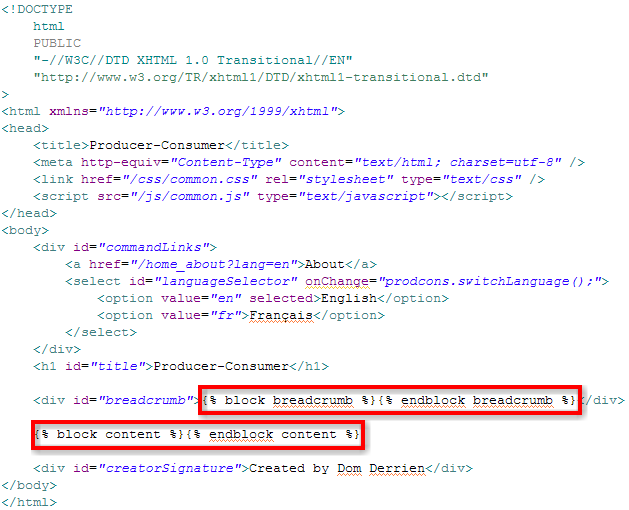
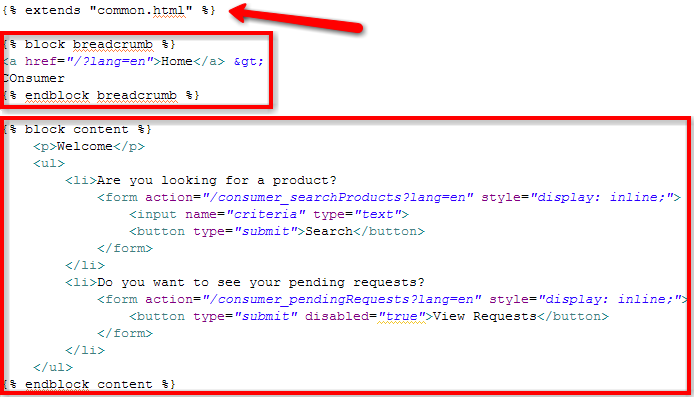
Dynamically generated content, like developers are used to producing with PHP for example, can be implemented with Django templates [3]. The following template defines the general Web page pattern. And the second template is just extending it by overriding the extension points.


Common.html template with the Web page organization and the extension points.


Producer.html template overriding the extension points with the page specific elements.

Note: because of internationalization concerns, I strongly recommend to NOT code Web pages as the ones above. Refer to my post on Internationalization of GAE Applications [14] for a better implementation.

Quickly, it is possible to use GAE to host static and dynamic pages on the domain appspot.com (pattern is http://[application-name].appspot.com/). Integrating these pages transparently in your own domain allows future updates without having your readers to point to a new Web address. You need to setup Google Apps for your Domain and follow their instructions [15].

App Engine Fan explains how to prevent access to your application from unknown domains [16]. In a private network, you can even open the GAE server to remote access [17].

Access to Google BigTable

In the Web application world, data persist mainly in databases. Databases scale, maintain indexes (providing quickly search results), support transaction (update, then commit or revert). Most databases are relational databases [18]. Among the well know relational databases, there are: Derby, Oracle, DB2, MySQL. SQL (Structured Query Language) is often the query language of relational databases.

GQL (Google Query Language) is very similar to SQL [19]. The discrepancies are due to GAE architecture. For example, to preserve its scalability of the underneath database, GQL does not offer the possibility to JOIN tables. I am not database expert, but I consider all limitations being workable and some of them are very sane.

One important issue with database is related to their central place: if they are corrupted, system can stop working. Being able to backup and restore them is critical. In April 2008, Google communicated about possible export file formats [20]. I have not found if this feature has been published... However, I found Aral Balkan's Gaebar application (GAE Backup And Restore) [21] which covers the basic functionality and even more (like the staging concept).

Update 2009/02/10:
In the SDK release 1.1.9, Google describes ways to upload data from a CSV into BigTable, and to download data into a local development server. Refer to the documentation on GAE Website [1].

Going further

Google has developed a GAE application that is gallery for other GAE applications [22]. Many applications are described there. Interviews of successful implementers are also available on GAE Website [1].

On April 10, 2008, Niall Kennedy posted a detailed article describing GAE architecture [23]. Many others people continue to publish on GAE and on Cloud computing issues in general [24]. It is a really hot topic ;)

Update 2009/02/10:
Dare Obasanjo published another post on Dare Obasanjo: Google App Engine on the road to becoming useful for building real web applications

A+, Dom
--
Sources:
  1. Google App Engine Website, and GAE Service API documentation.
  2. Official Python Website. Python history on Wikipedia. Guido van Rossum's blog (Python inventor).
  3. Django Website, with the section on its template language.
  4. Cloud Computing Conundrum: Platform as a Service vs. Utility Computing by Dare Obasanjo.
  5. Amazon Web Services Website.
  6. MVC Pattern applied to GAE Applications... (another post to be published soon).
  7. Eclipse Website.
  8. Article Configuring Eclipse on Windows to Use With Google App Engine from GAE documentation site.
  9. Eclipse plug-in for Git repositories: egit. Check egit short installation guide.
  10. My post on Git as my New SCM Solution.
  11. Quota description on GAE Website, on GAE blog, and on Wikipedia.
  12. Free Webhosting, Google App Engine style, by App Engine Fan.
  13. Using Google App Engine as your own Content Delivery Network by Matt Riggott.
  14. Internationalization of GAE Applications... (another post to be published soon).
  15. Access to the Standard Edition of Google Apps for Your Domain (GYAD) service and instruction on how to setup a GAE application for your domain.
  16. The darker side of multiplexing, or how to prevent site hijacking by App Engine Fan.
  17. Access Google App Engine Development Server Remotely, by Josh Cronemeyer.
  18. Definition of relational database by Wikipedia.
  19. GQL reference page on GAE Website.
  20. Getting your data on, and off, of Google App Engine on GAE official blog.
  21. Google App Engine Backup and Restore (Gaebar) by Aral Balkan
  22. Google GAE Application Gallery, being itself a GAE application.
  23. Google App Engine for Developers, by Niall Kennedy.
  24. Architectural manifesto: An introduction to the possibilities (and risks) of cloud computing on developerWorks.

Sunday, January 25, 2009

Automatic Testing of GAE Applications

(This post is part of the series Web Application on Resources in the Cloud.)

I am not a purist when it is time to apply a development method, I am a practical guy!

Update 2009/11/20
At one point, I switched to App Engine Java (see my post Google App Engine Meets Java). One of my argument at that time was the lack of tools Python-side to produce code coverage numbers... I've just posted a lengthy article about Unit tests, Mock objects, and App Engine for the Java back-end. The techniques and the code I share in this post allow me to reach the mystical 100% of code coverage, for a project with over 10,000 lines for the business code. See you there ;)

For example, I know by experience how important testing code as soon it is produced. And these tests must run after each code delivery to detect defects and regressions as soon as possible [1]. I allocate as much time to write tests (unit tests most of the time, functional tests occasionally) as I allocate to write code. And no task is considered complete if the corresponding tests do not cover 100%* of its code! I admire adopters of the Test Driven Development (TDD [2]) approach.

When searching information to test Google App Engine (GAE) applications, I was happy to find a post [3] written by Josh Cronemeyer who says:
My favorite way to start any project is by doing TDD. 
If you follow GAE tutorial [4], you can create a correctly designed application implementing the Model-View-Controller (MVC) pattern [5]. Testing such an application which organizes its behavior in different logical area means testing each areas independently:
  1. Testing Python models
  2. Testing Python business logic
  3. Testing data injection in Django templates
  4. Testing rendered HTML pages
  5. Verifying the use-cases' implementation
In the following sections, I am going to summarize information I gathered. If I missed any element, please, let me know by posting a comment ;)

Testing Python models

Verifying that your models work as expected is really important. If we can rely on the robustness of Google Big Database implementation (after all, more and more of their applications run on App Engine), you need at least to detect regressions that our future refactoring operations might introduce.

To learn how to setup your environment, read the detailed post of Josh Cronemeyer: Unit Test Your Google App Engine Models.
What follows is some information to get you started writing unit tests against a GAE model. First, a list of the tools you need to install.
  • Nose is a tool for running your python unit tests.
  • NoseGAE is a plugin for nose that bootstraps the GAE environment.
An alternative is to use gaeunit [6] but tests might impact the persistence layer.

Josh Cronemeyer suggests to create a new stub data store before running all tests (function called in your test setUp()):

from google.appengine.api import apiproxy_stub_map
from google.appengine.api import datastore_file_stub

def clear_datastore(self):
   # Use a fresh stub datastore.
   apiproxy_stub_map.apiproxy = apiproxy_stub_map.APIProxyStubMap()
   stub = datastore_file_stub.DatastoreFileStub('appid', '/dev/null', '/dev/null')
   apiproxy_stub_map.apiproxy.RegisterStub('datastore_v3', stub)

Testing Python business logic

What do I mean by Python business logic? This is the piece of code that deals with the end-user requests and that does some computations before pinging the persistence layer. For example, a function verifying the format of e-mail addresses (using regular expressions) belongs to that category.

This last 6 years, I have mainly used Java as the programming language to develop the server-side logic. Java is a simple and powerful programming language. Java benefits from big companies' support and has a large set of helper tools. As helpers, I can count: ant and maven, cruisecontrol and hudson, junit and code coverage, tools for static and dynamic code reviews, powerful IDEs, etc.

To developers starting to write unit tests with the target of covering 100% of the code, I have always suggested to read at least the chapter 7 of the book “JUnit in Action” [7], written by Vincent Massol. He introduces the Inversion Of Control (IOC) pattern and the Mock object concept:
Mock objects (or mocks for short) are perfectly suited for testing a portion of code logic in isolation from the rest of the code. Mocks replace the objects with which your methods under test collaborate, thus offering a layer of isolation. 
Python has also many frameworks to mock objects. Among them, Python Mocker seems to be very popular: it consists in recording behaviors and setting expectations on mock object, before letting them being used by real functions. See [9] for a detailed “how to use Mocker.”

Reminder: with the tip from Cronemeyer (see above with the stub for the data store, for more details look at [10]), there is no need to mock the data store.

Unit Test Sample in Python

The following piece of code defines utility methods which return 1) a list of supported languages and 2) a dictionary with localized labels (fallback on English one).

# -*- coding: utf-8 -*-

import en
import fr

def getLanguages():
    return {
        "en": en._getDictionary()["_language"],
        "fr": fr._getDictionary()["_language"],
    }

def getDictionary(locale):
    global dict
    if locale == "fr":
        dict = fr._getDictionary()
    else:
        dict = en._getDictionary()
    return dict

The series of tests in the following pieces of code verifies the list of languages contains at least English and French, verifies that the expected dictionaries contains the mandatory key with their name (“English” and “Français”), and that requiring an unexpected dictionary gives the English one.

# -*- coding: utf-8 -*-

import unittest
from prodcons.i18n import accessor

class SuccessFailError(unittest.TestCase):

    def test_getLanguages_I(self):
        """Verify at least 2 languages {en, fr} are in the dictionary"""
        self.assertTrue(len(accessor.getLanguages()) >= 2)
        self.assertEqual("English", accessor.getLanguages()["en"])
        self.assertEqual("Français", accessor.getLanguages()["fr"])

    def test_getDictionary_I(self):
        """Verify we can get a valid {en} dictionary"""
        self.assertTrue(accessor.getDictionary("en"))
        self.assertEqual("English", accessor.getDictionary("en")["_language"]) # Mandatory key

    def test_getDictionary_II(self):
        """Verify we can get a valid {fr} dictionary"""
        self.assertTrue(accessor.getDictionary("fr"))
        self.assertEqual("Français", accessor.getDictionary("fr")["_language"]) # Mandatory key

    def test_getDictionary_III(self):
        """Verify the fallback on the English dictionary"""
        self.assertTrue(accessor.getDictionary("no_NO"))
        self.assertEqual(accessor.getDictionary("en"), accessor.getDictionary("no_NO"))

Testing data injection in Django templates

Django comes with its own test runner! So its templates can be simulated in a stand alone mode.

With the help of Mocker [8], as described in [10], it is relatively easy to verify that your templates extract data as expected. If there is an unexpected data access to the Mock object, or if one attribute has been forgotten, the mock object will report it (a call to verify() ensure that all expectations were met.)

Testing rendered HTML pages

To verify that Django templates display the data as expected. Selenium [11] offers probably the best framework (and it's free):
  • Selenium IDE which runs as a Firefox extension and that can record, edit, and debug test scripts.
  • Selenium Remote Control (RC): it is a server that starts/stops browsers and that makes them running test scripts.
  • Selenium Grid: to control and run tests on remote Selenium RC instances (on WinXP, Win7, RedHat, Suse, etc.)
At that step, Selenium tests are considered being functional tests because they involve many parts of the application (do not work in isolation). It's fine to run them extensively in development environment, but should be carefully used in production (see next section).

The following presentation (3:30) shows how I write a test against my local deployment. The basic test ensure the language switcher works correctly:
  • Starting from the English homepage, it checks page title (in head>title and in div#title) against the label “Producer-Consumer”.
  • After having switched to the French page, it verifies that the URL has been updated correctly (no more lang=en, but lang=fr in place). It checks also the page title against “Producteur-Consommateur”.
  • After having switched back to the English page, it verifies the URL has been updated correctly.


Rapid definition of a test case with Selenium IDE.


Check points defined with Selenium IDE.


Verifying the use-cases' implementation

In Agile development, a sprint is a period of time allocated to complete development tasks. Each task or group of tasks implement a use-case, a story. Use-cases are used to validate the deliveries. Here is a simple story:
End-users fine-tune searches with the prefixes name:, producer:, and unit-price: 
At the beginning of a project, use cases are simple and can be covered by automatic tests. After a while, use cases become more complex and running them takes quite a long time and requires a heavy setup. These complex use cases are usually processed manually by human operators (Quality Engineers).

If these qualified workers can focus on complex use cases (all dumb ones are processed automatically), they have more possibility to find real bugs, I mean behaviors that coders forgot to cover, that product owners forgot to specify, etc. Sooner these bugs are discovered lower is their cost in terms of engineer time spent to fix them and in term of lost credibility!

I hope this helps!

Update 2009/01/30:
Josh, alias Shlomo, updated his post with an excellent reference of a discussion thread in Google App Engine group: Testing Recommendations. Look specifically at two messages posted by Andy about using Selenium tools, like this one:
Selenium-RC is not necessary since Selenium core can be added to your App Engine project directory and run from there. Collected steps below to save you time:
  1. Download the core: http://selenium-core.openqa.org/download.jsp
  2. Unzip selenium core zip file
  3. Copy this selenium core directory into your App path somewhere.
  4. Edit your app.yaml file to permit static access (static because it doesn't need a sever interpreter. selenium is written in javascript, so it runs in your browser.) Under "handlers:", add something like this:
    - url: /selenium
      static_dir: ./tests/SeleniumTests/selenium-core-0.8.3
static_dir is where I copied my selenium-core directory. To access selenium, I now open the app engine url, http://localhost:8080/selenium/index.html and run the TestRunner. From there, open your test suite and go. I had trouble loading individual tests for some reason, but suites work.

I could have of course done all of this using the Firefox Selenium-IDE plugin with fewer steps, but using the core approach does make it cross browser supporting.

I'm still trying to figure out how to use Python for this. I'll continue that in a separate message. 

A+, Dom
--
Note:
  • Providing 100% of code coverage by unit or functional tests is sometimes not possible. The test case shutting down remotely the application server to verify that pending transactions are persisted correctly cannot, for example, be scripted for automation. In such a situation, we should rely on manual testing. The goal of test automation is to provide the best coverage possible, so manual testers can focus on edge cases and on trying to discover unexpected issues.
--
Sources
  1. Agile: SCRUM is hype, but XP is as important... (another post to be published soon)
  2. Test Driven Development approach description on Wikipedia, and information on the book Test Driven Development by Kent Beck
  3. Unit Test Your Google App Engine Models by Josh Cronemeyer, and Josh's short bio from a speech he gave at OSCON in 2007.
  4. Google App Engine tutorial on Google Code.
  5. MVC Pattern applied to GAE Applications... (another post to be published soon)
  6. gaeunit is a test environment that runs on development environment (not on Google infrastructure).
  7. JUnit in Action, by Vincent Massol, edited by Manning Publications Co. Chapter 7, freely available, explains the IOC pattern and the benefits of using Mock objects. Vincent Massol is now technical lead of the open source project XWiki.
  8. Python Mocker: Mock object framework which allows to record behaviors and expectations before replaying them with real functions.
  9. Unit tests for Google App Engine apps, by App Engine Fan.
  10. Proper Unit Testing of App Engine/Django, by App Engine Guy
  11. The open-source framework for Web application automatic testing: Selenium IDE, Selenium RC, and Selenium Grid. Check the core features for information on the automating the tests -- See also a Japanese wiki on Selenium: JavaScud / Selenium IDE.

Wednesday, January 21, 2009

Book "Power of Surprise" by Andy Nulman

Because I read the announcement of Six Pixels of Separation "Surprise! Andy Nulman Is Giving Away Copies Of His New Book", a blog I have been following for a long time, I decided to give a try ;)
Hey Andy Nulman, here an address for another Montreal tech guy: 
7943, Duranceau, LaSalle (Qc) H8P 3R8.
Don't hesitate to post it yourself, Andy gives away 200 copies of his book! Check his blog powrightbetweentheeyes.typepad.com or his post on the offer. Don not forget to link www.andynulman.com for him to track you back ;)

Tuesday, January 13, 2009

Web Application on Resources in the Cloud

“What? Why? When? How?” are the four questions I am going to answer to introduce my first series of posts.
  • What? I am going to build a modern Web application using resources on the Cloud. Specifically, I am going to build an open Web application for consumers to find and review products in a big database, and for producers to offer products and find consumers. The infrastructure will use Google App Engine infrastructure [1].
  • Why? There are many aspects:
    • There is the professional benefit: In my post about Gary Reynolds' presentation “Career Advice '08” [2], or as posted by Tim O'Reilly in his post “Work on Stuff that Matters: First Principles” [3], it is mentioned that delivering value is a key differentiator. Building this working application will demonstrate my various expertise.
    • As an active member of Diku Dilenga [4] which delivers microloans to small enterprises in Democratic Republic of the Congo, I know that such application will help microentrepreneurs finding customers, and vice-versa. This project helps sharing my expertise with people who need help.
    • This project gives me also a chance to contribute to the open source community which has already given so much to me, my life, and my work.
  • When? I have already played with the Google App Engine SDK on my machine. I wanted to be sure no blocking issue would prevent me building the application. The application is already available at: http://prod-cons.appspot.com/
  • How? I am a Agile Methodology Adopter [5] so I do not plan far ahead. I am going to prepare a backlog with the tasks to implement, and I am going to address them according to their priority order. The code is regularly pushed on github [6]: http://github.com/DomDerrien/diku-dilenga/tree.
If you like the idea, if you want to learn new mechanisms, if you are OK with writing lots of unit tests, contact me. Because I am pretty busy at work, and I have to assume responsibilities for Diku Dilenga, the project will move slowly. But it will move and it will be fun!

Hints on the coming post in that series:
A+, Dom
--
Sources:
  1. Google App Engine website.
  2. My post on Career Advice '08 
  3. Tim O'Reilly post Work on Stuff that Matters: First Principles.
  4. Diku Dilenga website.
  5. Agile Manifesto, and Agile Methodology description on Wikipedia
  6. Github.com offers free hosting of open sources (charges applied to personal and commercial hosting).

Friday, January 9, 2009

Git as my New SCM Solution

As a developer in collaborative environments, I am used to relying on source control management systems [1]. In different companies, I worked with CVS [1], ClearCase [1], and subversion [2]. For my side projects (personal ones and ones related to my social involvements), I was a big fan of subversion.

But subversion has limitations, like the importance of the connectivity with the subversion server whenever you want to gain access a file history or to revert an update. Because I have just started a new side project [3], I have decided to go with git and the hosting service github [4].

I am going to describe the straightforward steps to setup, connect, and get working with git/github.

First thing: install git runtime. git has been developed in replacement to a tools used to manage linux kernel code. It has been preliminary built on linux. For Windows users, you can install it over cygwin or use a fork built over MSys. I am setup with msysgit [5].

The authentication mechanism on git repositories relies on SSH [6]. When creating an account on github, a public key is asked. Then anytime, the git runtime on your machine operates with the github server, it signs commands with your private key, and your public key is remotely used to verify the git runtime works on your behalf. To generate a pair of keys, just type the following command in a git bash window:

$ ssh-keygen -C "your@email.com" -t rsa

In order to use git on another machine, you have to copy over the generated SSH file (id_rsa and id_rsa.pub, from %USERDIR%/.ssh). To backup them, I suggest two services I mentioned in my list 2009 Products I Cannot Live Without: KeePass (as a personal encrypted repository) and DropBox (as the replicator from the cloud).

The first time, it is easier to use github website to create an initial repository. You can verify that your SSH key is correctly configure.

$ ssh git@github.com

I have created the project diku-dilenga. If the SSH key is recognized, you can ready to clone (checkout equivalent for subversion) any project you have access to, like mine:

$ git clone git://github.com/DomDerrien/diku-dilenga.git

Adding file in your own project is easy. Note that the add is recursive (so adding . (dot) from the root folder will add all files for the next commit).

$ git add doc/README

Persisting an addition or an update is simply done with the following command. Note that giving a meaningful comment or a project task identifier is highly recommended ;)

$ git commit -a -m "..."

For additional commands (to remove files, to create branches, to merge branches, etc.), you have to refer to reference sites like:

Once all additions, updates, and removal have been locally done, updating the remote server (github in my case), is fairly simple:

$ git push

Getting updates made by others, or from another computer, are also very simple:

$ git pull

Update 2009/01/13:
This post is now part of the series Web Application on Resources in the Cloud.
I recommend you read the introduction of my side project which is going to be visible on github.com/DomDerrien/diku-dilenga/tree.

Update 2009/01/15:
An illustrated guide to git on Windows [7] has been published on github website. I am not a big fan of complex graphical user interfaces (GUIs) where end-users loose the focus of their current task! I think pushing/pulling are relatively rare operations (compared to commit/revert/history) and should have a very light interface... My two cents

Update 2009/03/24:
Thanks to some follower's feedback, it appears that dealing with Git commands is still fuzzy. Here is aSequence diagram initially produced by Olivier Steele and described on git ready blog.


A+, Dom
--
Sources:
  1. Source Control Management description, CVS and ClearCase histories on Wikipedia.
  2. subversion is a popular cross platforms open source replacement to the aging CVS.
  3. Future posts will describe the nature of this project ;)
  4. Official git website, git history on Wikipedia, and github hosting service.
  5. Package of git for Windows: msysgit
  6. SSH network protocol and public-key cryptography principles on Wikipedia
  7. An Illustrated Guide to Git on Windows on github website.